
SVG Basics – Clipping
SVG Clipping
Clipping is the business of hiding what normally would be drawn. The stencil which defines what is and what isn’t drawn is called a clipping path. In SVG you can define a clipping path by placing shapes, paths and text inside a ‘clipPath’ element. You cannot use an image as a mask. It is like a special case of an opacity mask as everything is either on or off. The areas taken up by the graphics are fully transparent and everything else is opaque.
Clipping paths are used by referencing its URI using the ‘clip-path’ attribute all shapes and container tags use.
The ‘clipPath’ element can be placed inside the tag of the graphic which uses it separately in the definition section of your SVG document. Making a clipping path a child of a graphic however will not automatically make the graphic use it. You must still reference its URI.
Example 1. The eye is masked by a skewed ellipse. (Download)
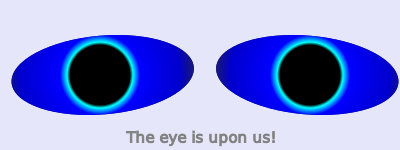
<clipPath id="eyeLeftPath">
     <ellipse cx="130" cy="75" rx="90" ry="40"
transform="skewX(-20)" />
 </clipPath>
     ....
 <g clip-path="url(#eyeLeftPath)"
onmousemove="mouseMove(evt);">
     <rect x="0" y="0" width="100%" height="100%"
fill="midnightblue"  />
     <circle id="leftEye" cx="100" cy="75" r="100"
fill="url(#eyeGradient)" />
</g>

Two basic operations are the intersection and the union of two clipping planes. SVG only supports the intersection of two planes by referencing another ‘clipPath’ element using the ‘clip-path’ attribute. There is no direct way to intersect 3 or more planes.
There is no direct way to take the union of two planes. The ‘use’ element doesn’t help much either as it can only directly reference shapes, text and paths when used in a clipping path.
Example 2. Taking the intersection and union of two clipping planes. (Download)

clipPath id="clip1">
     <polygon id="clip1Shape"
points="100,10 40,180 190,60 10,60 160,180 100,10" stroke="blue" />
        </clipPath>
 <clipPath id="clip2">
     <circle id="clip2Shape" cx="100" cy="100" r="65" />
 </clipPath>

  <!-- Union -->
 <clipPath id="clipUnion">
     <use x="0" y="0" width="200" height="200"
xlink:href="#clip1Shape" />
     <use x="0" y="0" width="200" height="200"
xlink:href="#clip2Shape" />
 </clipPath>

         <!-- Intersection -->
 <clipPath id="clipIntersection" clip-path="url(#clip1)">
     <use x="0" y="0" width="200" height="200"
xlink:href="#clip2Shape" />
</clipPath>

 ....
 <rect x="10" y="10" width="180" height="180"
fill="url(#myFillGrad)"
clip-path="url(#clipIntersection)"
transform="translate(400)" />
 <rect x="10" y="10" width="180" height="180"
fill="url(#myFillGrad)" clip-path="url(#clipUnion)"
transform="translate(600)" />
|
Attribute
|
Explanation
|
|
clip-path
|
The referenced clipping path is intersected with the referencing clipping path. |
|
clipPathUnits
|
The values are either ‘userSpaceOnUse’ or ‘objectBoundingBox’. The second value makes units of childern a fraction of the object bounding box which uses the mask. (default: ‘userSpaceOnUse’) |
Childern of a clipping path can be any shape, text or path. A child tag is any tag which is inside another tag. All presentation attributes like ‘fill’ and ‘stroke’ are ignored as only the shape area is needed to make a clipping path. The ‘use’ element can be used only if it directly references a shape, text or path. It cannot reference a container element like ‘g’.
Comments