
SVG Basics – Path Element
SVG Path
The path element is the single most useful tag for creating professional looking SVG documents and it’s the most difficult tag to hand-code in SVG. It is quite hard to visualize anything but the most simple of paths.
|
Attribute
|
Explanation
|
|
d
|
A set of commands which define the path. (See below)
|
|
pathLength
|
If present then the path will be scaled so that the computed path length of the points equals this value. A negative value is an error. (Note: Unsupported by Adobe’s plugin)
|
|
transform
|
A list of transformations.
|
|
Presentation Attributes
|
Color, FillStroke, Graphics, Markers
|
The path is defined in the ‘d’ attribute of the ‘path’ tag by a string of white space seperated commands and coordinates.
Path commands are case-sensitive, An uppercase command’s points use absolute postioning and a lowercase command’s points are relative the last point. The one exception to this is the first point always uses absolute postioning.
The path is defined in the ‘d’ attribute of the ‘path’ tag by a string of white space seperated commands and coordinates.
Path commands are case-sensitive, An uppercase command’s points use absolute postioning and a lowercase command’s points are relative the last point. The one exception to this is the first point always uses absolute postioning.

|
Command
|
Parameters
|
Repeat
|
Explanation
|
|
M
|
x,y
|
Yes
|
moveto: Moves the pen to a new location. No line is drawn. All path data must begin with a ‘moveto’ command.
|
|
Line Commands
|
|||
|
L
|
x,y
|
Yes
|
lineto: Draws a line from the current point to the point (x,y).
|
|
H
|
x
|
Yes
|
horizontal lineto: Draws a horizontal line from the current point to x.
|
|
V
|
y
|
Yes
|
vertical lineto: Draws a vertical line from the current point to y.
|
|
Cubic Bezier Curve Commands
|
|||
|
C
|
x1 y1 x2 y2 x y
|
Yes
|
curveto: Draw a cubic bezier curve to the point (x,y) where the points (x1,y1) and (x2,y2) are the start and end control points, respectively.
|
|
S
|
x2 y2 x y
|
Yes
|
shorthand/smooth curveto: Draw a curve to the point (x,y) where the point (x2,y2) is the end control point and the start control point is the reflection of the last point’s end control point.
|
|
Quadratic Bezier Curve Commands
|
|||
|
Q
|
x1 y1 x y
|
Yes
|
Quadratic Bezier curveto: Draw a quadratic bezier between the last point and point (x,y) using the point (x1,y1) as the control point.
|
|
T
|
x y
|
Yes
|
Shorthand/smooth quadratic Bezier curveto: Draw a quadratic bezier between the last point and point (x,y) using the reflection of the last control point as the control point.
|
|
Elliptical Arc Curve Commands
|
|||
|
A
|
**
|
Yes
|
elliptical arc: Draws and arc from the current point to x, y. The actual scale factor and position of the arc needed to bridge the two points is computed by the SVG viewer.
|
|
End Path Commands
|
|||
|
z
|
–
|
No
|
closepath: Closes the path. A line is drawn from the last point to the first.
|
Note: To use relative positioning simply use a lowercase letter for the command.
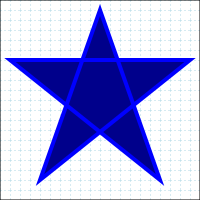
stroke=”blue” fill=”darkblue” stroke-width=”4″ />
Cubic Bezier Example
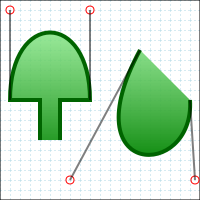
100 L60,100 60,140 M140,50 C70,180 195,180 190,100 ”
stroke=”darkgreen” stroke-width=”4″ fill=”url(#hill)”
/>
Quadratic Bezier Example

230 150,150 230,100 150,50 100,-30 50,50″ stroke=”darkblue”
stroke-width=”4″ fill=”url(#myFillGrad)”
/>
Elliptical Arc Example
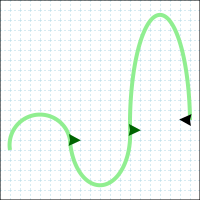
A15 55 180 0 1 190 120″ stroke=”lightgreen” stroke-width=”4″
fill=”none” marker-mid=”url(#marker2)” marker-end=”url(#marker1)”
/>
Placing text on a path is accomplished by defining a path and inside a ‘text’ element using a ‘textPath’ element to reference the path.

Comments