
SVG Basics – JavaScript in SVG
JavaScript in SVG
The other sections of the tutorial deal with how to use SVG to make beautiful shapes. In this section, let’s put those shapes to work doing some real work by using Javascript to glue them together. Most SVG viewers support JavaScript (ECMAScript) as their main scripting language but SVG is not limited to only that language.
JavaScript can either be embeded or in an external file. The next code example shows both styles.
<script type=”text/ecmascript”><
…
]]></script>
To preform an action when an event occurs you just add the event handler to the associated object. This is much like HTML except the event names must be all lowercase letters.
|
Event
|
When Called
|
| onclick | When the object is clicked (mouse button down and up) |
| onmousedown | When the mouse button is pushed down on the object |
| onmouseup | When the mouse button is released on the object |
| onmouseover | When the mouse cursor moves over the object |
| onmousemove | When the mouse moves in the object |
| onmouseout | When the mouse cursors leaves the object |
|
Example
|
Code
|
<script type="text/ecmascript"> |
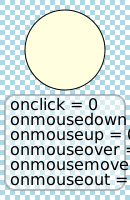
The current version of the Adobe SVG plugin automatically sets the variable “svgDocument” to be the SVG document root. This is a useful nonstandard feature of the viewer but to ensure compatibility with older versions of the plugin you should set the variable if it isn’t present. To do this, add an init function which is called when the onload event occurs which extracts and sets the document root from the event.
<svg onload="init(evt)" ...>
 <script type="text/ecmascript"><![CDATA[
 function init(evt) {
     if ( window.svgDocument == null )
         svgDocument = evt.target.ownerDocument;
 }
 ]]></script>
The Batik SVG viewer sets the variable “window.document” to be the SVG document root and is incompatible with the above code.
If SMIL animation doesn’t quite handle how you want to animate something in SVG then the alternative is using JavaScript (EcmaScript). SMIL animation is very handy but there are plenty of behaviours that can be much more easily modeled by using JavaScript.
Comments