
Create a nice logo for Construction Company
1. Create a New Document 450x200px and Fill the background with color #595959.
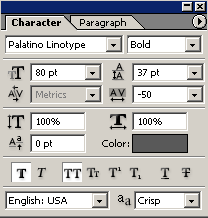
2. Type ‘C’ using font Paltino Lynotype with settings:
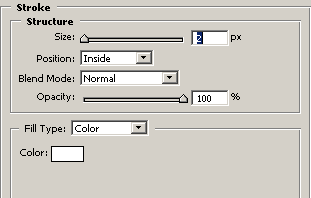
Apply Stroke from Blending Options:
Results:


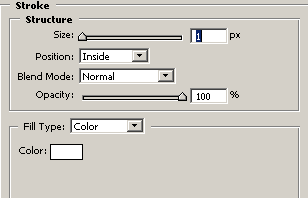
3. Draw a rectangle with Rectangle Tool(U), color#595959 and apply Stroke from Blending Options:
Results:

4. Now draw 2 dotted line like:

I drawing this line with Brush Tool(B), use this settings:
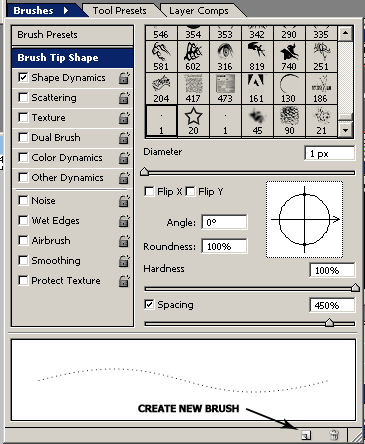
Create New Brush
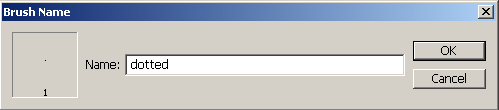
Now using this New Brush you cand draw a dotted line.
5. Draw one line and Rotate angle of 45 degrees, draw another line but Rotate angle of -45 degrees:

6. Third line we drow angle of 90 degrees:

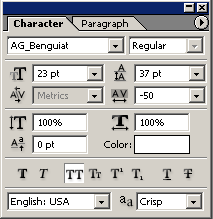
7. Now we’re giving the final touches, add text for Construction Company, I type ‘CONSTRUCTION’ with font:
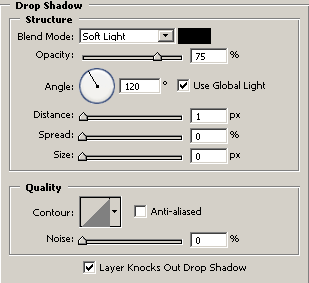
Apply Drop Shadow from Blending Options:
Add your slogan and we have a nice logo:

Good luck, and be sure to check out our other Photoshop Tutorials!
Comments