
Exporting your animation
September 9, 2006 | 0 comments
Exporting your animation
After Effects provides a variety of options for integrating an animation with Flash, such as video output, Flash video, and image sequences. You can also export a SWF file from After Effects. However, the 3D layers are not supported in the current SWF files exported from After Effects.
In this part you will export your 3D animation from After Effects as a PNG image sequence to preserve the transparency to Flash:
- Choose File > Export > Image Sequence.
- In the Export Image Sequence dialog box, set the exporting format to PNG.
- Enter 30 as the Frames per Second value.
-
Click the Options button and choose Millions of Colors+ from the PNG Options dialog box so you can export the image sequence with an alpha channel (see Figure 6).
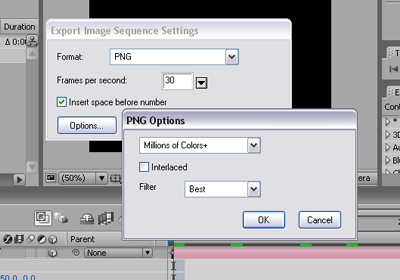
Figure 6. Exporting the star animation as a PNG sequence
- Name your image sequence Comp 1 and click OK to save your changes.

Comments