Categories

Partners
  • Website Templates

  • Adobe Photoshop Tutorials

  • Bittorent and
    Google desktop programs

  • Free Stock Photos and Images

  • Adobe Photoshop Tutorials

  • Photoshop, Flash, 3dsmax tutorials
  • Search


    Advanced Search


    Subscribe

    File sharing and versioning with Version Cue CS2
    Published  05/10/2006 | Creative Suite


    Productivity made simple

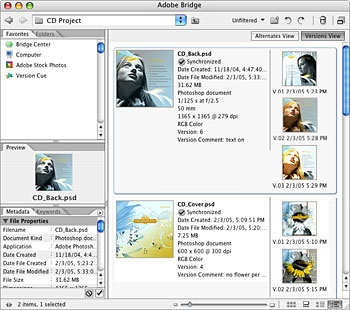
    Find files fast, track versions across applications, link files together, and share them in creative collaboration without fear of overwriting someone else's work.

    Versioning


    Shared project information

    Actively track the status of project files and enable this information to be easily shared across workgroups.


    Simplified sharing for small workgroups

    Easily share files with others within the Version Cue Workspace and keep your files safe without fear of them being overwritten. View the status of each file to know who is working on what file.


    Automatic file naming

    Say good-bye to awkward filenames such as "brochure_final_final3.indd." Instead, you can name a file to suit your preferences and let Version Cue handle the version tracking without the need for a naming convention.


    File version notification

    Receive helpful reminders while updating versions or placing photos and illustrations in layouts.

    Article Series
    This article is part 7 of a 9 part series. Other articles in this series are shown below:
    1. Adobe Creative Suite 2 New features
    2. Image editing with Adobe Photoshop CS2
    3. Drawing and illustration with Adobe Illustrator CS2
    4. Page layout with Adobe InDesign CS2
    5. Web design with Adobe GoLive CS2
    6. Client review and print output with Adobe Acrobat 7.0 Professional
    7. File sharing and versioning with Version Cue CS2
    8. File browsing and organizing with Adobe Bridge
    9. Royalty-free images with Adobe Stock Photos

    WiFiReview.com - your guide to the wireless world