
Stylish Metal Border
October 4, 2006 | 0 comments
Stylish Border
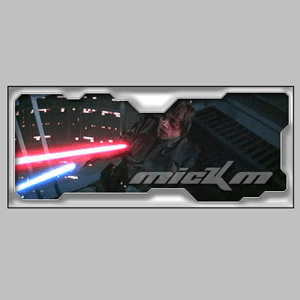
This tutorial will teach you how to create stylish metal borders that you can use for your signatures! A very great tutorial for the guy/girl that wants to start simple…
Style up your signatures with this metal border!
-
Step 1 Open up a picture you like or create a signature of your liking;
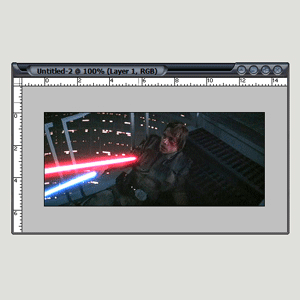
-
Step 2 Press Ctrl+A, Ctrl+C ;
Open a new document (leave the sizes untouched) and press OK;
Press Ctrl+V;
Create a new layer;
Grab the Polygonic Lasso-Tool and make a funny shape that looks like mine;
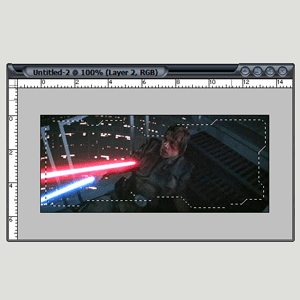
-
Step 3 Press Ctrl+Shift+I;
Fill the shape with WHITE;
Press Ctrl+D;
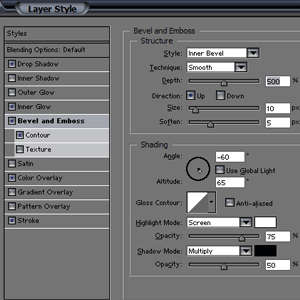
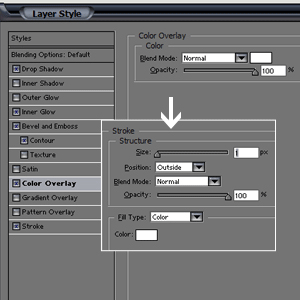
Now add these setting to the layer;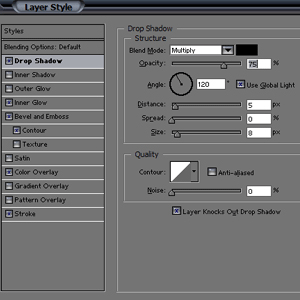
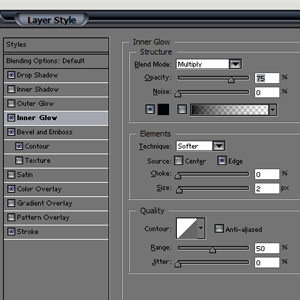
-
Step 4 Add some text and you’re done…
Author : MICK MOOLHUIJSEN
HomePage : http://www.mickm.com

Comments