
Photo Reflection Effect
Reflection
Learn how to make your photo have a realistic refelection. This technique is great for logo’s where you need to get that perfect glass reflection!
Edit a photo and make it have a reflection!
-
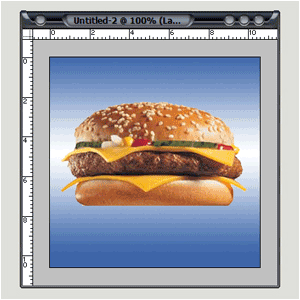
Step 1 Open a new image with a nice background and a picture you want to have a reflection of;
-
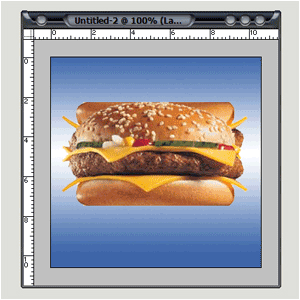
Step 2 Duplicate the layer and flip the layer vertical;
The upside-down layer must be placed under the original;
-
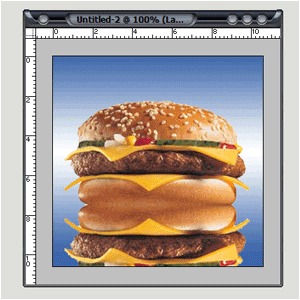
Step 3 Move the upside-down layer down ’till both bottoms (original and copy) touching each other…
-
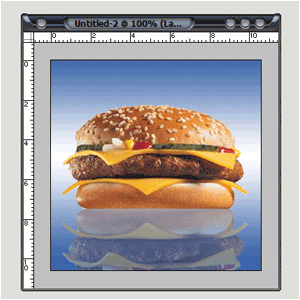
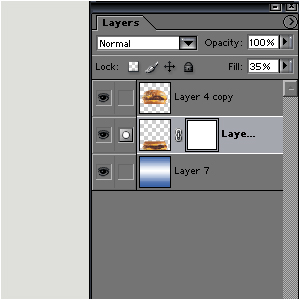
Step 4 Lower the opacity to 35%;
-
Step 5 Go to Layer>Add Layer Mask>Reveal All;
-
Step 6 Grab your Gradient-Tool and set it to default; (black+white, lineair, normal, 100%, reverse NOT CHECKED!!!)
Move the gradient down ’till you see the bottom part of the upside-down layer disappear;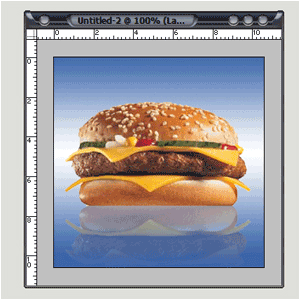
End And there you have your reflection!
HomePage : http://www.mickm.com

Comments