
Water Reflection
October 5, 2006 | 0 comments
Water Reflection
Add realism to a photo by adding a water-reflection.
-
Step 1 Get a FULL image of someone or something;

-
Step 2 Duplicate the image and place it, vertically flipped, UNDER the image;


-
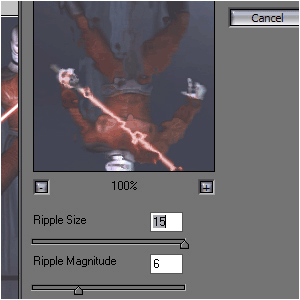
Step 3 Go to Filter>Disort>Ocean Ripple and set it to these options;
-
Step 4 Now it should look like this;

-
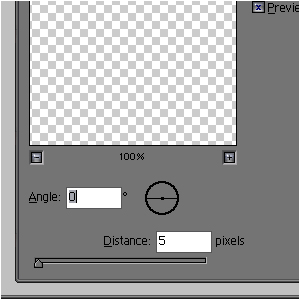
Step 5 Go to Filter>Blur>Motion Blur and set it to these options;
-
Step 6 And you can also add some perspective if you want…
I didn’t do it.
Author : MICK MOOLHUIJSEN
HomePage : http://www.mickm.com
HomePage : http://www.mickm.com

Comments