
Free Knitting Pattern – Simplicity Background
Pattern Background
This nifty tutorial will teach you how to make repeating pattern-backgrounds. This tutorial will use standard shapes only!
Learn how to make a pattern background!
-
Step 1 First of all, let me tell you that for this tutorial, you don’t need fancy shapes, because Photoshop allready has a large variety of shapes like the ones below:

-
Step 2 Create shape with some objects.
Your shape doesn’t HAVE to look like mine, but it has to “kinda” fill the square space;

-
Step 3 Once done, merge all the shapes together and downscale it using CTRL+T;

-
Step 4 Time to turn on the GRID with CTRL+’
Once the grid is on, you must center your shape just by dragging it to the center. The grid will automatically center it;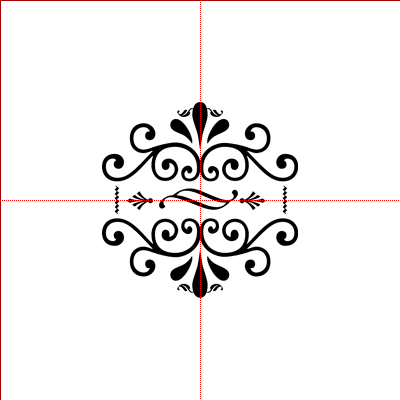
-
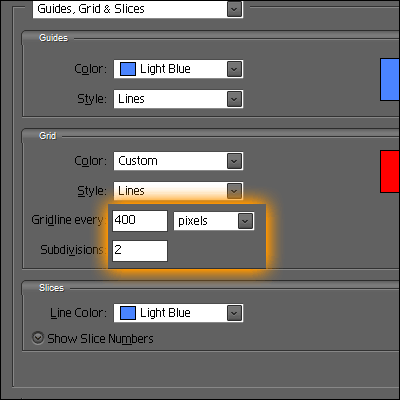
Step 5 Go to Edit>Preferences>Grid.. etc… and choose the options that will devide your document in 4(!!!) pieces. I choose these options;
-
Step 6 Then select (WITH THE GRID ON) the lower-right corner and place it in the upper-left corner;

-
Step 7 Do the same opposite-pasting with all corners;

-
Step 8 Then select all corners and merge them together.
The downscale them and place them in the middle;
-
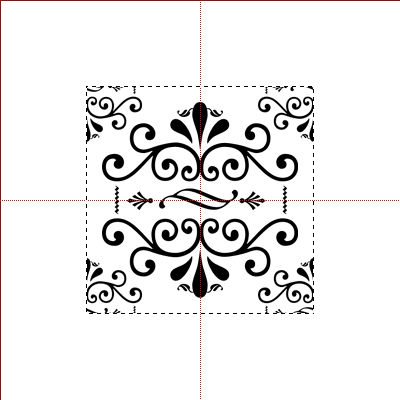
Step 9 Make a selection around it;
-
Step 10 With the selection on, go to Image>Crop;

-
Step 11 Then save it as a pattern by going to Edit>Define Pattern and then later go to Edit>Fill and fill the layer with your new pattern and use it whereever you like!

Author : MICK MOOLHUIJSEN
HomePage : http://www.mickm.com

Comments