
New features in Adobe Photoshop CS2
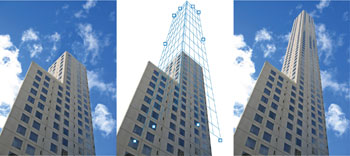
Revolutionary Vanishing PointAchieve amazing results in a fraction of the time with the groundbreaking Vanishing Point, which lets you clone, paint, and paste elements that automatically match the perspective of the surrounding image area.
Multiple layer controlSelect and move, group, transform, and warp objects more intuitively by clicking and dragging directly on the canvas. Easily align objects with Smart Guides. Smart ObjectsPerform nondestructive scaling, rotating, and warping of raster and vector graphics with Smart Objects. Even preserve the editability of high-resolution vector data from Adobe Illustrator software. Multi-image digital camera raw file processingAccelerate your raw file workflow with simultaneous processing of multiple images while you continue working. Import images into your choice of formats, including Digital Negative (DNG); enjoy automatic adjustments to exposure, shadows, and brightness and contrast; and much more. 
Image WarpEasily create packaging mock-ups or other dimensional effects by wrapping an image around any shape or stretching, curling, and bending an image using Image Warp. |
Comments