Home Page
|
Affiliates
|
Privacy Policy
|
Syndicate
|
HostGator Hosting
Categories
Acrobat Family
Adobe Photoshop
Adobe Technologies
Creative Suite Family
Digital Imaging
Macromedia Products
Print and Web Publishing
Video and Audio
Design Software
Digital Photography Software
Photoshop Plugins
Partners
Free Flash Website
Website Templates
Adobe Photoshop Tutorials
Bittorent and
Google desktop programs
Free Stock Photos and Images
Adobe Photoshop Tutorials
Merry Christmas Tree
Search
-- All Categories --
- Acrobat Family
- Acrobat 3D
- Acrobat Capture
- Acrobat Distiller Server
- Acrobat Elements
- Acrobat Elements Server
- Acrobat Messenger
- Acrobat Professional
- Acrobat Reader
- Acrobat Standard
- Create Adobe PDF Online
- Adobe Photoshop
- 3D Effects
- Animation
- Buttons
- Color Management
- Designing
- Drawing Techniques
- Other
- Photo Editing
- Photoshop Basics
- Scripting Documentation
- Special Effects
- Text Effects
- Textures & Patterns
- Web Layout
- Adobe Technologies
- Extensible Metadata Platform (XMP)
- Extreme
- Job Definition Format (JDF)
- PDF JobReady
- Portable Document Format (PDF)
- PostScript
- Printer drivers
- Creative Suite Family
- Creative Suite
- Production Studio
- Design Software
- 3D Modeling & CAD
- Animation
- Authoring Tools
- Desktop Publishing
- Flash Design Tools
- Font Tools
- Fonts
- Illustration
- Digital Imaging
- Graphics Server
- Photoshop
- Photoshop Album
- Photoshop Elements
- for Macintosh
- for Windows
- Digital Photography Software
- Digital Camera Firmware
- Digital Photo Tools
- Image Editing
- Media Management
- Macromedia Products
- Macromedia Authorware
- Macromedia Captivate
- Macromedia ColdFusion MX
- Enterprise
- Standard
- Macromedia Contribute
- Macromedia Dreamweaver
- Macromedia Fireworks
- Macromedia Flash
- ActionScript
- Free Flash Games Download
- Flash Action Games
- Flash Arcade Games
- Flash Card Games
- Flash Fun Games
- Flash Movies Games
- Flash Racing Games
- MiniClip Games
- Xiao Xiao
- Macromedia Flash Player
- Macromedia Flash Professional
- Macromedia FlashPaper
- Macromedia FreeHand
- Macromedia HomeSite
- Macromedia RoboHelp Office
- Macromedia RoboInfo
- Photoshop Plugins
- 3D
- Color management
- Photographic
- Retouching
- Special effects
- Textures/frames
- Print and Web Publishing
- Design Bundle
- FrameMaker
- GoLive
- Illustrator
- InCopy
- InDesign
- PageMaker
- SVG Viewer
- Video Bundle
- Web Bundle
- Video and Audio
- After Effects
- Audition
- Encore DVD
- Premiere Pro
- Video Bundle
Advanced Search
Photoshop Templates
Photo Contests
Photo Tips
Photoshop
St. Louis LASIK | LASIK info
Load Cells
osCommerce Templates
MiracleBurn
Flex Belt
Free Internet Psychic Readings
Web Hosting
»
Adobe Home
»
Adobe Photoshop
»
Drawing Techniques
»
Paper Stuff Icon
Paper Stuff Icon
Published 11/3/2006 |
Drawing Techniques
Paper Stuff Icon - part 1
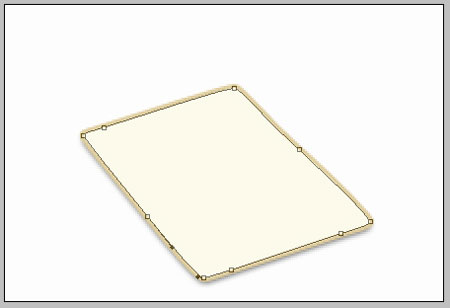
Create a new file that would have the next parameters: 322x150px and 300dpi of white color.

Choose the following tool
to draw the next picture.
Fill 0% on the layers.
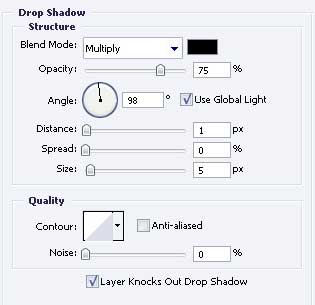
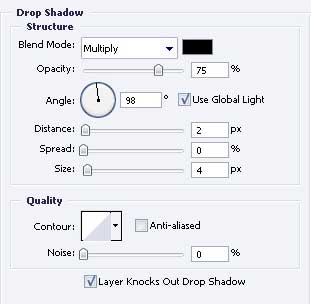
Blending Options-Drop Shadow
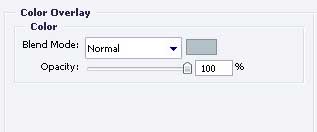
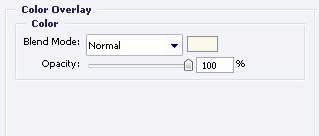
Blending Options-Color Overlay
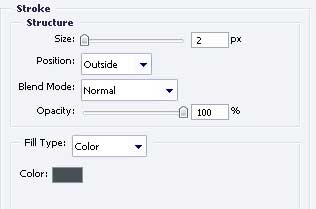
Blending Options-Stroke
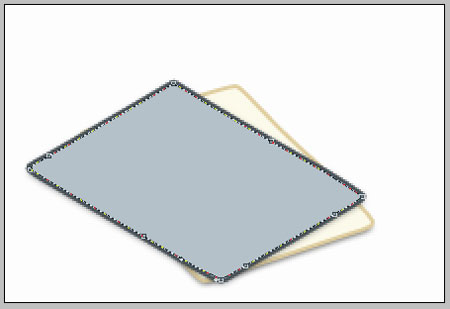
Take the previous instrument to represent one more picture, like the next from below.
Fill 0% on the layers.
Blending Options-Drop Shadow

Blending Options-Color Overlay
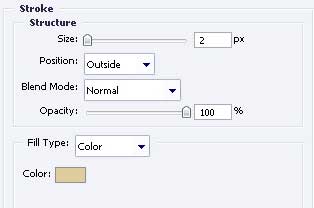
Blending Options-Stroke
Take the known tool
to represent the next figure, with the same parameters form below.
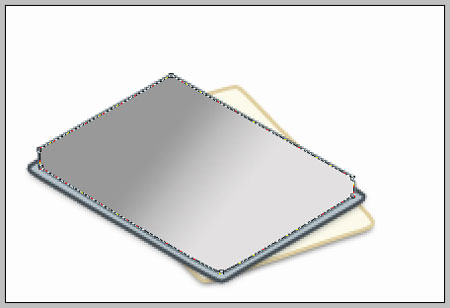
Fill 0% on the layers.
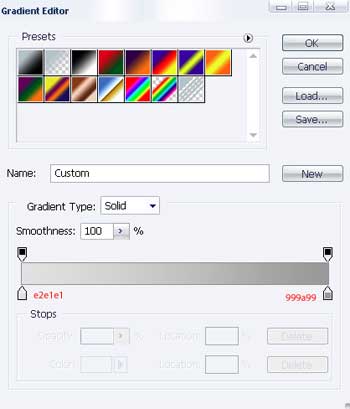
Blending Options-Gradient Overlay
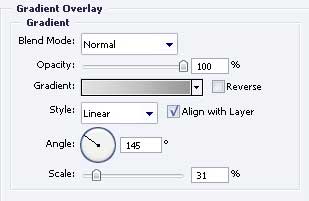
Gradient’s parameters
Pages:
« Back
1
2
Next »
Next: Paper Stuff Icon - part 2 »
Paper Stuff Icon
In this tutorial we will learn how to create notebook icon or logo
Copyright 2008 Adobe Photoshop Tutorials - Learn Adobe Photoshop, Illustrator, Dreamweaver, Flash, Effect, InDesign, GoLive, Acrobat Reader . All rights reserved.
Powered by
Z-design