Categories

Partners


  • Free Flash Website

  • Website Templates

  • Adobe Photoshop Tutorials

  • Bittorent and
    Google desktop programs

  • Free Stock Photos and Images

  • Adobe Photoshop Tutorials

  • Photoshop, Flash, 3dsmax tutorials
  • Search


    Advanced Search


    Subscribe

    Web Header for Personal Blog
    Published  12/1/2006 | Web Layout
       
    Web Header for Personal Blog - part 1


    Create new file that would have 773x220 px and 72 dpi. Using the next instrument , mark out the same places indicated below with the shown parameters next step.

    Web Header for Personal Blog in Photoshop CS

    Blending Options-Inner Shadow

    Web Header for Personal Blog in Photoshop CS

    Blending Options-Color Overlay

    Web Header for Personal Blog in Photoshop CS

    Take the same instrument and represent a rectangle with the shown sizes next step.

    Web Header for Personal Blog in Photoshop CS

    Blending Options-Inner Shadow

    Web Header for Personal Blog in Photoshop CS

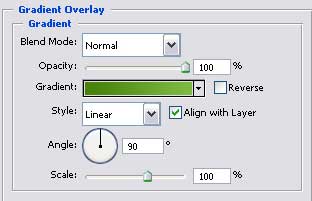
    Blending Options-Gradient Overlay

    Web Header for Personal Blog in Photoshop CS

    Gradient’s parameters.

    Web Header for Personal Blog in Photoshop CS

    Take the previous instrument and picture one more figure (a rectangle) that must have the parameters form the lower picture.

    Web Header for Personal Blog in Photoshop CS

    Blending Options-Drop Shadow

    Web Header for Personal Blog in Photoshop CS

    Blending Options-Inner Shadow

    Web Header for Personal Blog in Photoshop CS

    Web Header for Personal Blog in Photoshop CS Web Header for Personal Blog
    With the help of this tutorial, you will be able to create a professional and trendy blog inteface.

    WiFiReview.com - your guide to the wireless world