Computer Store Web Layout
December 12th, 2006 by ART-D Posted in Adobe Photoshop, Web Layout
The Blending Options parameters are the same for both buttons.
Create now a rectangle, using next instrument
to the left side of those three goods. The rectangle’s color’s code must be 6B7B81. Apply next parameters. 
That is must we get on this work’s stage. 
In this rectangle must be inserted the sub-catalogue of the companies, producers of these goods. Represent them with bullets to the left side of their names. Choose for this the instrument
, minimizing the size of the pointer till 1px and insert 5 squares, like it is done below. 
Our Sub-Catalogue of Brand must look this way. 
Create now two rectangles, applying Rectangle Tool
with the color’s code d1dbdf and represent a stripe under them colored in 818586. That is what we should get. 
Insert on the left lower rectangle a couple of logotypes. 


Web designers
04/09/2009
Very tech Delicious design .
raymond
02/03/2010
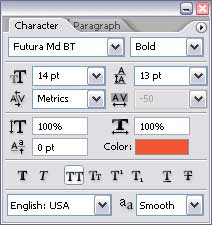
What is teh details, add to card font? email me please.
Amin
19/04/2010
Very Helpful……at least i’m happy
newsnetbook
03/05/2010
hmm very nice share and useful info thanks for your sharing
anura
18/05/2010
this is very good tutorial from you… this was really very helpful…so thank you very much..
laptopsleek
29/06/2010
good tutorial….. thanks for share…. i like it
Ryuu
19/07/2010
Splendid, and thanks to your tutorial I hope to be able to create something along those lines. But i guess, simplicity is the key to website designing and building.
Tim Richards
30/09/2010
Your tutorial has been an great source of information. I will come back many times. I wish other sites like this for information. Thanks for your great thoughts.
Arte fact
14/11/2010
Hello great tutorial, i’m stuck at the brush part. Could you please be more specific regarding the flare? I mean the type of brush and the color?
thanks!!!
Arte FACT
Seth Waite
26/01/2011
Thanks for the tutorial for photoshop. It’s a pretty simple tutorial which makes it easy to follow.
Thanks,
buyer and seller
26/04/2011
Thanks for the tutorial for photoshop. simplicity is the key to website designing and building.
Inewsphone
09/07/2011
great tutorial….. niche share…
thanks
sovit
11/07/2011
thanks you for providing such a nice tutorial..very very thanks again.
Ramakrishna
12/08/2011
Great tutorial, shall i get how to convert to html also?