Categories

Partners
 
  • Photoshop Templates

  • Website Templates

  • Web Templates

  • Flash Web Sites

  • WordPress Templates

  • Free Ringtones

  • Free Stock Photos and Images

  • Photoshop

  • St. Louis LASIK | LASIK info

  • Load Cells

  • osCommerce Templates

  • Web Hosting


  • Website Templates
    Search


    Advanced Search


    Create Realistic Speakers
    Published  12/28/2006 | Drawing Techniques
       
    Create Realistic Speakers - part 1


    Open a new file with 308x470 px and 300 dpi.

    Create Realistic Speakers in Photoshop CS

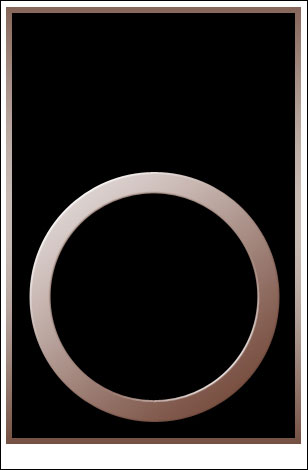
    Take the shown instrument and try to represent a box designed for audio system. The box must be painted in black.

    Create Realistic Speakers in Photoshop CS

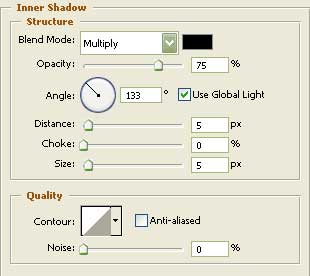
    Blending Options-Inner Shadow

    Create Realistic Speakers in Photoshop CS

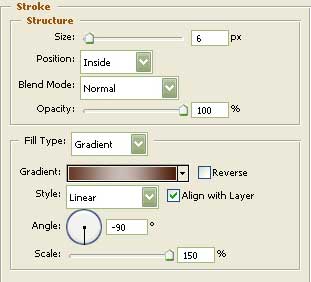
    Blending Options-Stroke

    Create Realistic Speakers in Photoshop CS

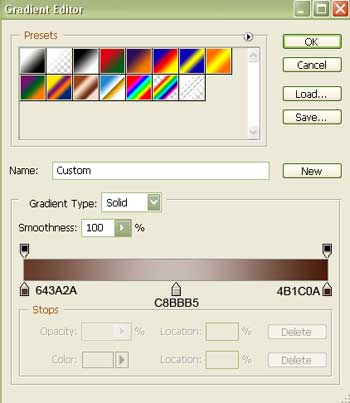
    Gradient’s parameters:

    Create Realistic Speakers in Photoshop CS

    Represent now the last part of the big speaker. Apply the next tool to choose the correspondent cliché like it is demonstrated in the picture.
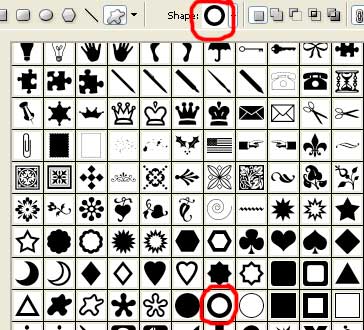
    Create Realistic Speakers in Photoshop CS

    Create Realistic Speakers in Photoshop CS

    Fill 0% on the layers.
    Blending Options-Bevel and Emboss
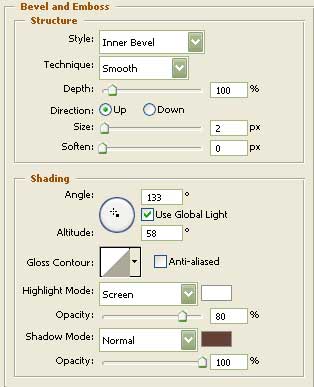
    Create Realistic Speakers in Photoshop CS

    Create Realistic Speakers in Photoshop CS Create Realistic Speakers
    We will learn how to design Realistic Speakers.


    PSDTUTS+ Photoshop Tutorials and More