
Fire Ball
Fire Ball
Author Name: TDW
URL: http://www.thedesignworld.com
1. Make a 400×400 document. Now press “D” on your keyboard to reset the foreground and background colors to black and white. Make sure your background is BLACK.
2. Now apply Filter>Render>Clouds then Filter>Render>Difference Clouds on the background layer.
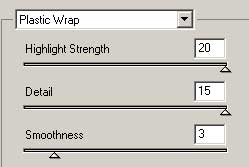
3. Now Filter>Artistic>Plastic Wrap and use these settings:
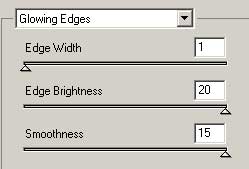
Now apply Filter>Stylize>Glowing Edges and use these settings as well:
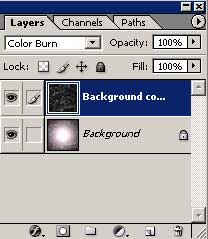
4. Duplicate the layer and set the new duplicated blending mode to Color Burn:

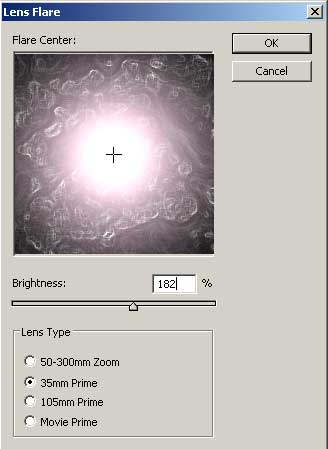
5. Apply a Filter>Render>Lens flare right in the middle of the bottom layer. Use these settings or modify them to your liking:
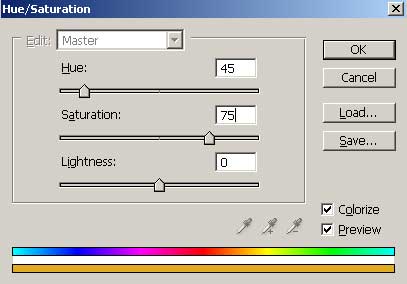
6. With the bottom layer still selected press CNTRL+U and use these color settings:
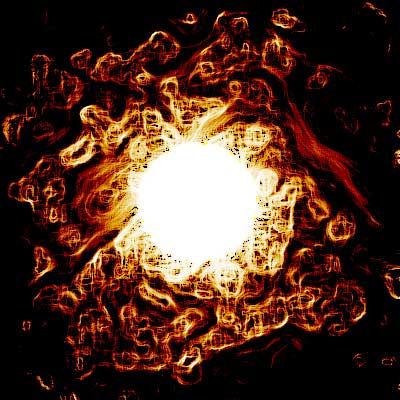
Your done, heres my fire ball:
Comments