Categories

Partners
  • Website Templates

  • Adobe Photoshop Tutorials

  • Bittorent and
    Google desktop programs

  • Free Stock Photos and Images

  • Adobe Photoshop Tutorials

  • Photoshop, Flash, 3dsmax tutorials
  • Search


    Advanced Search


    Subscribe

     »  Adobe Home  »  Adobe Photoshop  »  Web Layout  »  VoIP Provider Layout
    VoIP Provider Layout
    Published  01/30/2007 | Web Layout
       
    VoIP Provider Layout - part 1


    VoIP Provider Layout
    Make a solid company web layout for your site.


    Create a new file that would have 956x818 px and 72 dpi.
    Take this instrument and represent the lowest layer for initializing the user. It is colored in F2ECD5.

    Create VoIP Provider Layout in Photoshop CS

    Select the next instrument and create the layer, reserved for the site’s header.

    Create VoIP Provider Layout in Photoshop CS

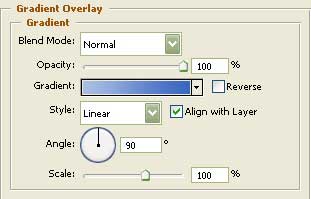
    Blending Options-Gradient Overlay

    Create VoIP Provider Layout in Photoshop CS

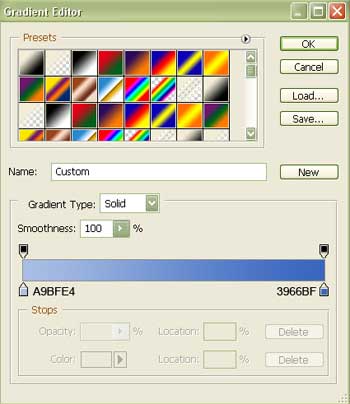
    Gradient’s parameters:

    Create VoIP Provider Layout in Photoshop CS

    Introduce after that the photo on the site’s header, cut it out preliminary and processed on its sizes.

    Create VoIP Provider Layout in Photoshop CS

    Create VoIP Provider Layout in Photoshop CS VoIP Provider Layout
    Make a solid company web layout for your site.

    WiFiReview.com - your guide to the wireless world