Professional Web Layout for Business Solutions

February 7th, 2007 by ART-D Posted in Adobe Photoshop, Web Layout

Professional Web Layout for Business Solutions

Make a stylish and clean professional layout for your Business Solutions site.

Create a new file with 766×792 px and 72 dpi. Paint it in this shown color: 6D6D6D.

Create Professional Web Layout for Business Solutions in Photoshop CS

Select now this instrument and represent the lowest layer of the site’s panel, colored in white.

Create Professional Web Layout for Business Solutions in Photoshop CS

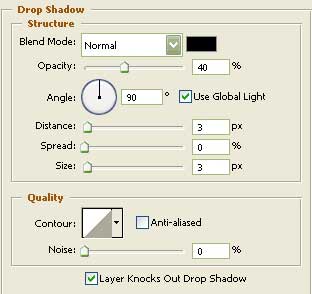
Blending Options-Drop Shadow

Create Professional Web Layout for Business Solutions in Photoshop CS

Using the previous instrument, it’s possible to represent one more layer, this time for the site’s section.
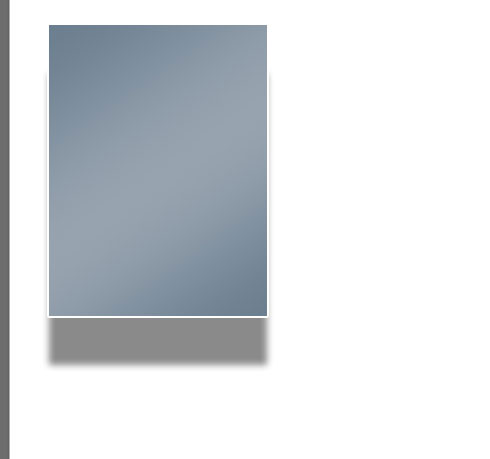
Create Professional Web Layout for Business Solutions in Photoshop CS

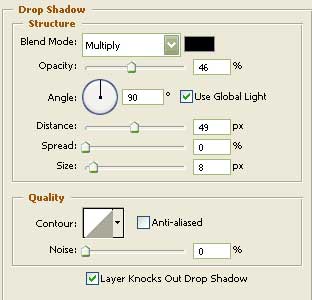
Blending Options-Drop Shadow

Create Professional Web Layout for Business Solutions in Photoshop CS

Post Pages: 1 2 3 4 5 6 7 8 9 10 11 12 13 14 15

  • Web designers

    04/09/2009

    Perfectly designed for cutting edge business very cool tutorial nice to implement this.

  • Yadav

    16/09/2009

    Nice tutorial this is help full for me

  • Korn

    19/10/2009

    Oh! Big usefull for me.
    Thank you so much.

  • virat

    31/10/2009

    good thanks……………………….

  • Arminder

    23/11/2009

    Excellent tutorial - but I would like to see the process used to convert it to a XHTML/CSS layout.

  • sameer

    04/04/2010

    very nice tutorial .But how did you use composition rules to divide
    given place .
    Why you choose particular color scheme?How did u place right
    object at right place.
    please reply.

  • Pouya

    16/06/2010

    This is so nice & perfect but i don’t know how add css/html code to this please say

    thank you very much
    I’m Persian

  • Mani

    14/07/2010

    Cool layout design…really helpfull for me

  • Louie

    24/07/2010

    how to convert it to xhtml/css??can you show us how?thanks in advance.