Categories

Partners
 
  • Photoshop Templates

  • Website Templates

  • Web Templates

  • Flash Web Sites

  • WordPress Templates

  • Free Ringtones

  • Free Stock Photos and Images

  • Photoshop

  • St. Louis LASIK | LASIK info

  • Load Cells

  • osCommerce Templates

  • Web Hosting


  • Website Templates
    Search


    Advanced Search


     »  Home  »  Adobe Photoshop  »  Web Layout  »  Design Studio Web Layout
    Design Studio Web Layout
    Published  02/13/2007 | Web Layout
       
    Design Studio Web Layout - part 1


    Learn how to create a simplistic but effective contemporary web layout for your Design Studio.

    Open a new file having 555x671 px and 72 dpi, then paint it in this indicated color’s code: 586168.

    Create Design Studio Web Layout in Photoshop CS

    Select after that the following instrument and create a part of the lowest site’s panel:

    Create Design Studio Web Layout in Photoshop CS

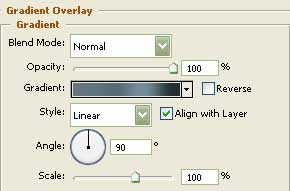
    Blending Options-Gradient Overlay

    Create Design Studio Web Layout in Photoshop CS

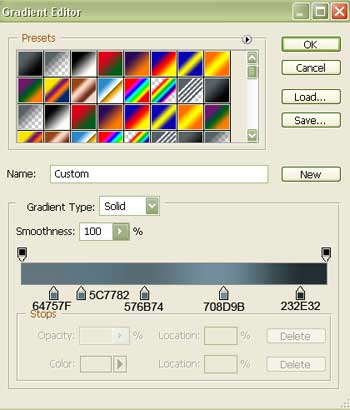
    Gradient’s parameters:

    Create Design Studio Web Layout in Photoshop CS

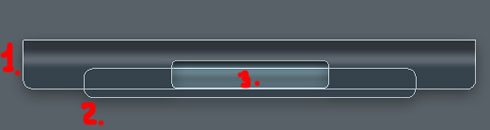
    Selecting the same instrument, it’s possible to create the lowest site’s panel in 3 stages.
    In the first stage we’ll create the first element (correct its angles with the instrument shown here ).
    The second stage includes pressing the Shift button and do the rest of the work.
    In the third stage keep pressed the Alt button and erase the middle of the figure.
    Create Design Studio Web Layout in Photoshop CS

    Create Design Studio Web Layout in Photoshop CS Design Studio Web Layout
    Learn how to create a simplistic but effective contemporary web layout for your Design Studio.


    PSDTUTS+ Photoshop Tutorials and More