Categories

Partners
  • Free Flash Website

  • Website Templates

  • Desktop Wallpapers

  • Adobe Photoshop Tutorials

  • Bittorent and
    Google desktop programs

  • Free Stock Photos and Images

  • Adobe Photoshop Tutorials

  • Merry Christmas Tree

  • IPowerWeb Hosting
  • Search


    Advanced Search


    PSD to HTML

    Gnome Linux Wallpaper
    Published  03/6/2007 | Drawing Techniques

    Download PSD File

       
    Gnome Linux Wallpaper - part 1


    This tutorial walks you through steps in creating profressional background and wallpapers.

    Create a new file with 1600x1200 px and 72 dpi.
    Start representing the primary texture’s cliché.
    Select the next tool and apply it on a new layer: 4x4 px to create first elements, like the next ones. The color is 4D7FA2.

    Create Gnome Linux Wallpaper in Photoshop CS

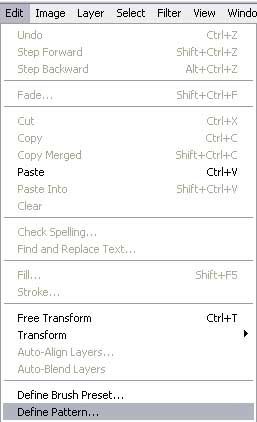
    Save it!

    Create Gnome Linux Wallpaper in Photoshop CS

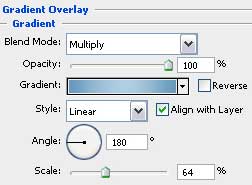
    Set the parameters from the table:
    Blending Options-Gradient Overlay

    Create Gnome Linux Wallpaper in Photoshop CS

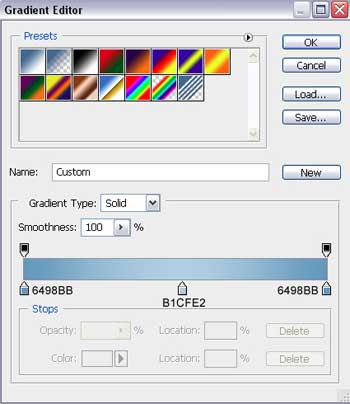
    Gradient’s parameters:

    Create Gnome Linux Wallpaper in Photoshop CS

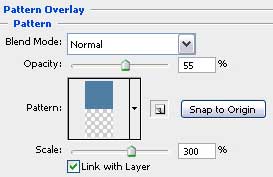
    Blending Options-Pattern Overlay

    Create Gnome Linux Wallpaper in Photoshop CS

    Create Gnome Linux Wallpaper in Photoshop CS Gnome Linux Wallpaper
    This tutorial walks you through steps in creating profressional background and wallpapers.