Graphic Design Studio Web Layout
April 2nd, 2007 by ART-D Posted in Adobe Photoshop, Web Layout
The parameters for the text are the same in all cases:
Blending Options-Drop Shadow
Insert the titles of the site’s sections, keeping te demands from the table below: 
(Latest news) 
(About company) 
(The software) 
The text’s parameters are the same also.
Blending Options-Drop Shadow
Fill the site’s sections with the corresponding text: 
(This is a legal agreement…)


Aman
04/02/2010
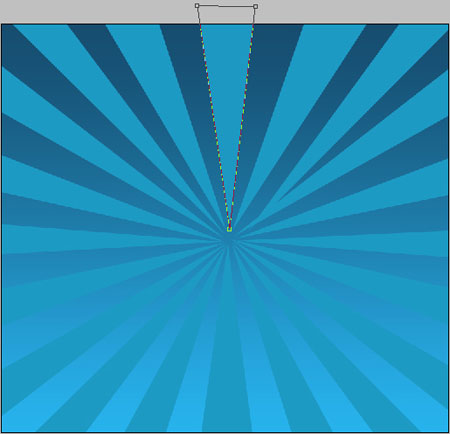
Hi Thanks fr this tutorial.. But i think its not complete… as you said.. that after making triangle rays with pentool..have to add some perameters rite… okay once its done.. wat about the bottom rays then.. top 20 rays are dark and the bottom 20 are light… something missing… can yew check it ot and then lemme know.. Otherwise its gud.
Thanks..
karan
30/08/2011
Hi is there any chance you could put up a tutorial for this on youtube? it would be really helpful, as im struggling to complete the design. thanks.
peti193
28/12/2011
great tutorial
Bass
25/03/2013
Really I couldn’t design the background.I am new in Ps and i didn’t know how to go through steps…is there any chance to make a more detailed tutorial..thanks in advanced