
Futuristic Wallpaper
April 17, 2007 | 0 comments
Learn how to create a futuristic wallpaper in this tutorial.
Firstly we need to create a new file with 1024×768 px and 72 dpi and then select the Rectangle Tool (U) to represent the background for the picture to be:

Fill 0% in layer’s panel and make a right mouse’s click on the marked layer to set the next parameters:
Blending Options>Gradient Overlay
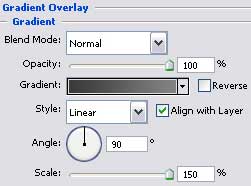
Gradient’s parameters:

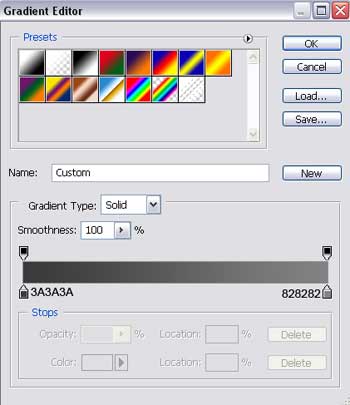
Select now the Rounded Rectangle Tool (U) to draw a kind of metallic plate with rounded edges:
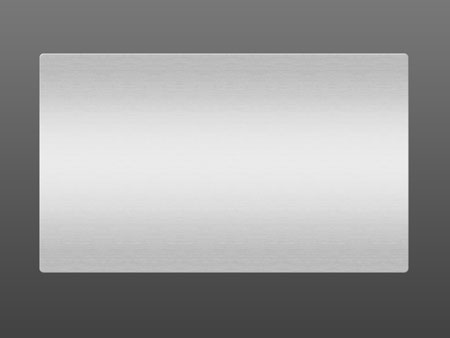
Set the parameters in the layers’ panel:
Fill 0%
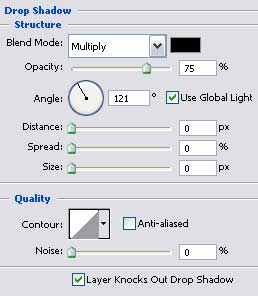
Blending Options>Drop Shadow
Blending Options>Bevel and Emboss
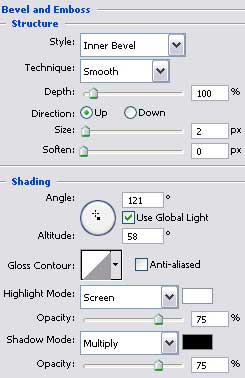
Blending Options>Gradient Overlay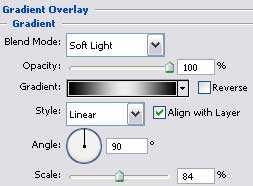
Comments