Virtual DJ Picture
April 27th, 2007 by ART-D Posted in Adobe Photoshop, Drawing Techniques
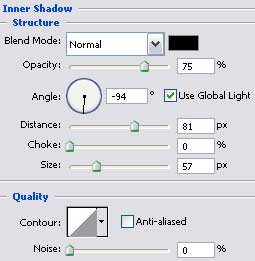
The layer’s parameters:
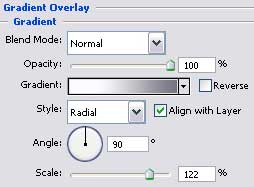
Blending Options>Gradient Overlay
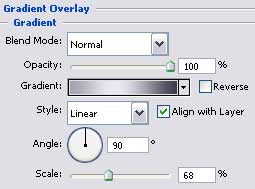
Gradient’s parameters: 
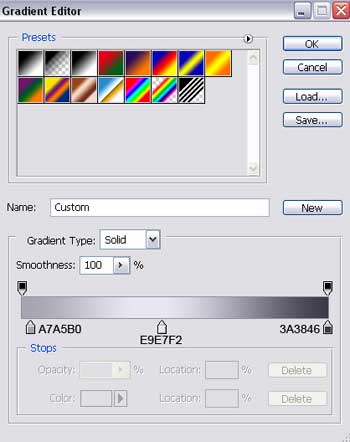
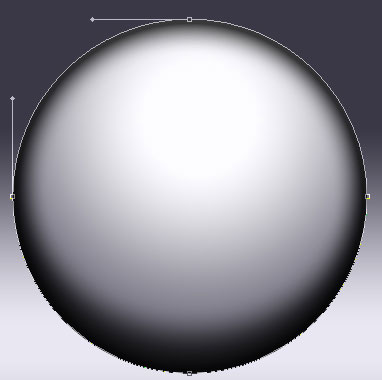
We need to select after that the Pen Tool (P) and represent one more strengthening elements, colored this time in 9B98A6. 
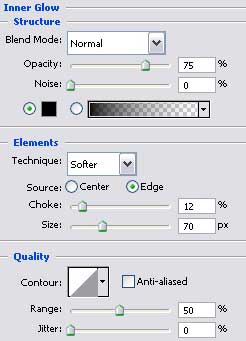
The layer’s parameters:
Blending Options>Inner Glow 
Blending Options>Bevel and Emboss
Blending Options>Stroke
Post Pages: 1 2 3 4 5 6 7 8 9 10 11


frostI
04.27.07
amazing outcome. i love tech, so this is wonderful for me.
badly enough i can’t make it. not enough skill.
only got skill at signatures
Graphic Student
04.27.07
Not liking this tutorial very much. It’s missing a few things that throws off students trying to go along with this tut. Many in my class cannot understand this past page 3.
fjellrev
04.27.07
where is the rest of it?
anthony
04.27.07
I thought it was a great tutorial. There are a few details that you are missing in the tutorial, like how to move the positioning of a radial gradient in blending mode. I still haven’t been able to figure that one out.
Pinina
04.27.07
Wow… this was an amazing tutorial. It only took me like… 5 days to figure out but it was SO MUCH FUN!!!! I loved it.
Here’s my result:
~Pinina
Pinina
04.27.07
Oops.. didn’t work. Here’s the URL so just copy it and paste. http://i821.photobucket.com/albums/zz137/tedashiifan/virtualdjbackground.jpg
~Pinina