Categories

Partners
  • IPowerWeb Hosting

  • Free Flash Website

  • Website Templates

  • Adobe Photoshop Tutorials

  • Bittorent and
    Google desktop programs

  • Free Stock Photos and Images

  • Adobe Photoshop Tutorials

  • Photoshop, Flash, 3dsmax tutorials

  • Merry Christmas Tree
  • Search


    Advanced Search


    PSD to HTML

     »  Adobe Home  »  Adobe Photoshop  »  Buttons  »  Media Icon
    Media Icon
    Published  05/4/2007 | Buttons
       
    Media Icon - part 1


    In this Photoshop tutorial I'll teach you how to make a media icon.

    Open a new file (File>New) that would have 450x450 px and 72 dpi.
    Select after that Ellipse Tool (U) to represent the primary layer of loud speaker to be next.
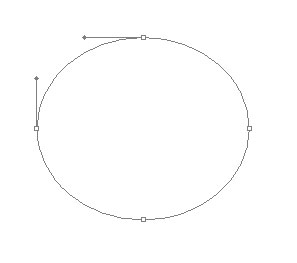
    Create Media Icon in Photoshop CS

    The layer’s parameters:
    Fill 0% on the layers.
    Blending Options>Drop Shadow
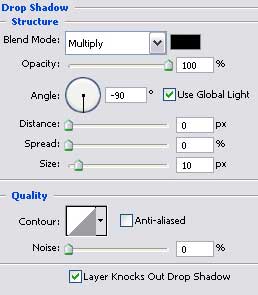
    Create Media Icon in Photoshop CS

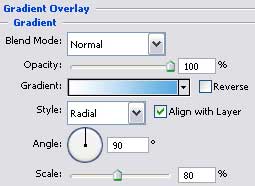
    Blending Options>Gradient Overlay

    Create Media Icon in Photoshop CS

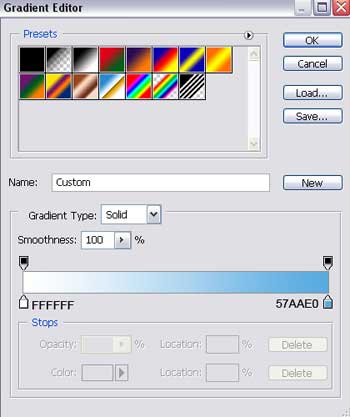
    Gradient’s parameters:

    Create Media Icon in Photoshop CS

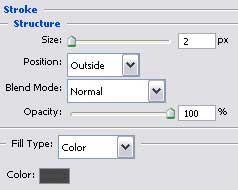
    Blending Options>Stroke

    Create Media Icon in Photoshop CS

    Create Media Icon in Photoshop CS

    Create Media Icon in Photoshop CS Media Icon
    In this Photoshop tutorial I'll teach you how to make a media icon.