Love Wallpaper for the desktop
July 5th, 2007 by ART-D Posted in Adobe Photoshop, Drawing Techniques
In this tutorial you will learn how to create a high quality love desktop wallpaper.
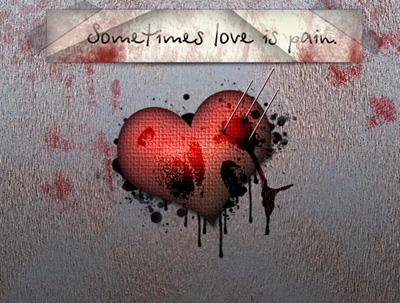
Final Image Preview
For the beginning we have to create a new file (File>New), having 1024×768 px and 72 dpi. Choose after that the Gradient Tool (G) to paint the file, applying the color’s parameters shown below:

the color’s codes are #А8B7BC and #4F5C64.


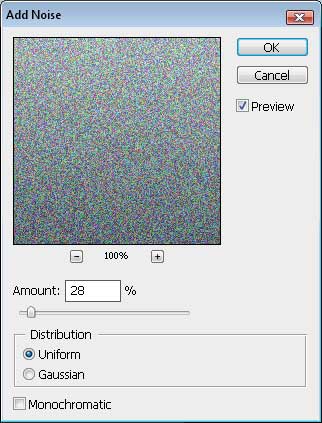
Select now Filter>Noise> Add noise…
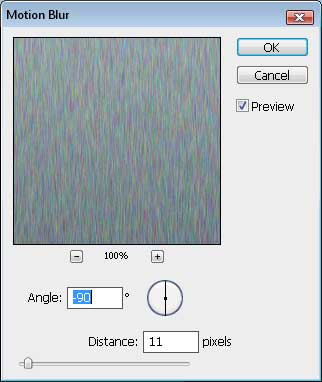
Next we’ll select Filter>Blur>Motion blur…
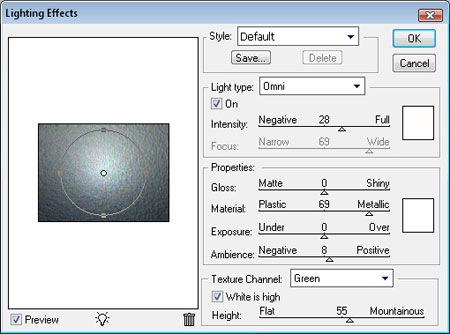
Make a copy of this layer and choose the filter’s parameters, situated in Filter>Render>Lighting Effects…
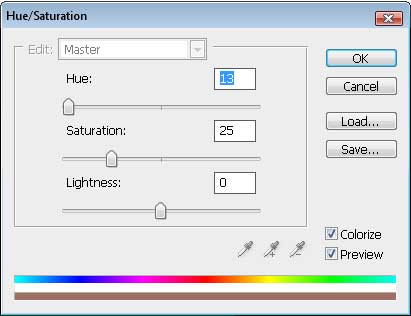
Apply also for this layer the next option – Hue/Saturation, an option that may be chosen by pressing simultaneously Ctrl+U. This way we’ll change the layer’s color.
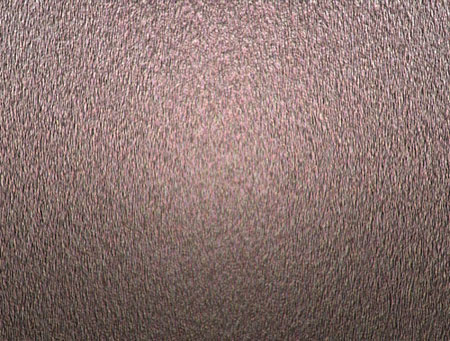
You may see the result that we have got at this moment:
Next step includes applying the mask for the upper layer. The mask may be selected from the layers’ palette.
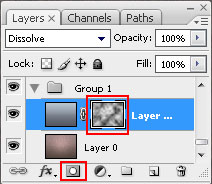
Click on the mask and select Filter>Render>Clouds, but don’t forget to apply the same parameters demonstrated below:
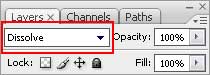
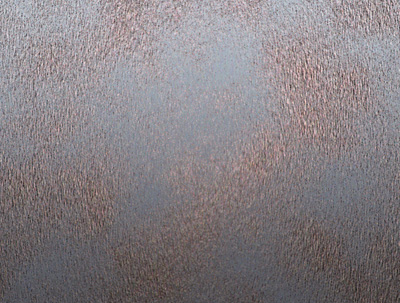
This is the new result:
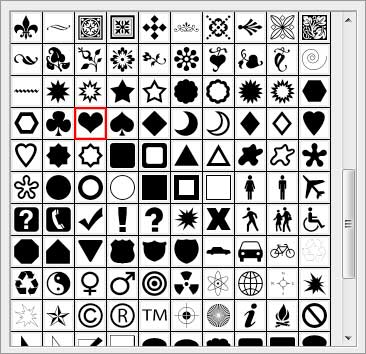
Next we’ll select the Custom Shape Tool (U) with the shape Heart Card.
Place the heart exactly the same way it is demonstrated next image:

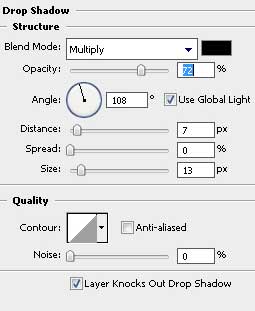
Apply the Blending Options>Drop Shadow, inserted in the table below:
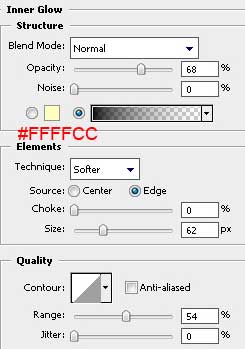
Blending Options>Inner Glow
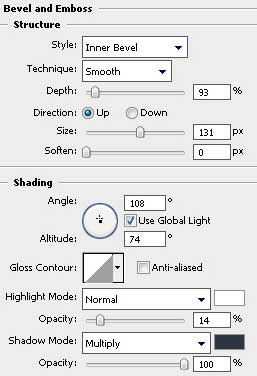
Blending Options>Bevel and Emboss
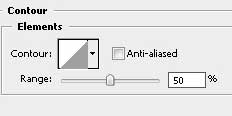
Blending Options>Bevel and Emboss>Contour
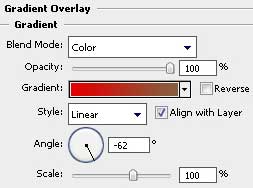
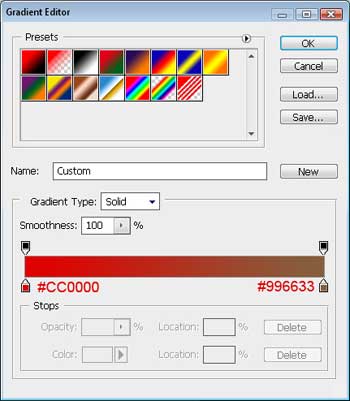
Blending Options>Gradient Overlay


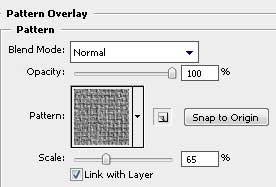
Blending Options>Pattern Overlay. The texture set Artist surfaces. The texture’s name is Dark coarse weave.
You must get the same result as the next one:

Create a new layer under the heart’s one and represent on it black drops and sparks, using the usual Brush Tool (B). The brushes may be found in the Internet and they have the next titles: Evil_Blood_Splat and Blood_Splatter_Brushes_By_Vexing_Art.

Create immediately one more new layer and use a brush from those earlier applied that has the name Blood_Splatter2, and represent a blot of black color on the heart.

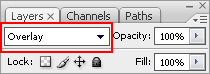
It should become of blood’s color, which is why we’ll set the parameters on the layers’ palette as it is shown in the next table:
We should represent on this heart several more patches, using the brush finger prints brushes by hawksmont that may be downloaded in Internet too.

Set the parameters for the layers’ palette as it is indicated below:

Post Pages: 1 2
Tags: abstract, design, desktop, heart, love, Photoshop, valentine, wallpaper


McMardigan
16/03/2010
Man One of the most complete tutorials on the web
just love it
keep doing it cool
hannah
29/07/2010
this was kind of confusing. what is hachuring? and some of it wasn’t completely explained.
hannah
29/07/2010
also in the 64bit version of cs5 it doesn’t have lighting effects. so i’m screwed for that part
Ly Pham
21/01/2011
wow, i looooove it
This is an awesome tut! Thank you for sharing the information.
joey
03/03/2011
how can i make one?
gozo
16/04/2011
thanx ya’ll this is amazing….
carlos
26/04/2011
it’s a awesome design, but it’s a little confusing and wasn’t fully explained some things mmm the font where get download? sorry with my english =D
Trinity
13/05/2011
This is an awesome design. However, I must point out the bad and good points. I would say this tutorial is more for the moderate to advance PS user. I am being a beginner user. So this Tut is my very first attempt at using PhotoShop CS3.
The Tut doesn’t mention what version is being used. My version does not have the “Pattern Overlay. The texture set Artist surfaces. The texture’s name is Dark coarse weave.” preset into the program. The writer doesn’t tell you how to rotate the image of the heart layer and not the whole canvas. (HOW TO ROTATE: http://photo.net/digital-darkroom-forum/00MA70) The writer doesn’t offer links to websites where you can download the custom shape tools, brushes or patterns. (Download sites are linked below.) It doesn’t tell you how to adjust the color swatch in the “Inner Glow” and “Gradient Overlay” steps (I had to double click on the tiny paint bucket on the slider.), nor does it tell you in the “Inner Glow” step how to select the black fade to transparent. To this day I still don’t know how this person got that. (Must have been something pre-made by the writer of this Tut.) I was able to download the Blood_Splatter_Brushes_By_Vexing_Art but I was not able to find “Evil_Blood_Splat_By_Vexing_Art” anywhere so I had to wing it.
Here are the sites I was able to find to download the necessary brushes for this Tut.
finger prints brushes by hawksmont: (“Evil_Blood_Splat” was not found)
http://hawksmont.com/blog/photoshop-brushes-fingerprints/
Blood_Splatter_Brushes_By_Vexing_Art:
http://vexingart.deviantart.com/art/Blood-Splatter-Brushes-11819573
ALTERNATIVES are below:
I used the “small angel mesh” in the metal Pattern download which I found was a nice alternative to the “Dark coarse weave” that was required for the Tut since my PS version didn’t have this pattern. (I’m assuming there is a cs3 patch out there to get this pattern but I haven’t found one yet.)
http://www.cruzine.com/2010/06/25/professional-photoshop-patterns/
Custom Shape Tool with the shape Heart Card:
http://graphicssoft.about.com/od/photoshopdownloads/ss/shapes1.htm
Overall, I would still say this Tutorial was helpful is showing me where some things are in PhotoShop and what the affects are. I know I didn’t make an exact copy of the Tutorial but I think is still came out nice.
http://i278.photobucket.com/albums/kk102/juciecotour/BleedingHeartWallpaper.jpg
lived
22/10/2011
Great tutorial, very well explained and very neat idea
trip media
06/02/2012
dude wheres the blending option?? cant find it .. im just new to this and because valentines is right out of the corner.. can someone tell me where it is ??
Gumper
17/02/2012
@tripmedia…if your referring to Blending Option/Drop Shadow and your using a newer version of PS, it will be part of the fx options in the Layers pallet. With the that layer selected, go the the fx button at the bottom of the layers pallet and select Drop Shadow from the menu. (This is the best way because you can go back and tweak it if needed)
Also available in the top menu bar of Photoshop. Go to Layer/Layer Style/Drop Shadow.
Hope you got it worked out in time for the big V-Day.