Categories

Partners


  • Free Flash Website

  • Website Templates

  • Adobe Photoshop Tutorials

  • Bittorent and
    Google desktop programs

  • Free Stock Photos and Images

  • Adobe Photoshop Tutorials

  • Photoshop, Flash, 3dsmax tutorials
  • Search


    Advanced Search


    Subscribe

     »  Adobe Home  »  Adobe Photoshop  »  Designing  »  Graphic Art
    Graphic Art
    Published  09/11/2007 | Designing
       
    Graphic Art - part 1


    Learn about orb special effects while converting an ordinary orb into a fantasy art piece in this Adobe Photoshop tutorial.

    Inspired from  *Tamilia  Orb-Vector Wallpaper.

    Create a new file (File>New) that must have 1024x768 px and 72 dpi.

    Create Graphic Art in Photoshop CS3

    Select now the Rectangle Tool (U) and represent the background of the picture to be next:

    Create Graphic Art in Photoshop CS3

    The layer’s parameters: Blending Options>Gradient Overlay
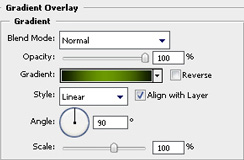
    Create Graphic Art in Photoshop CS3

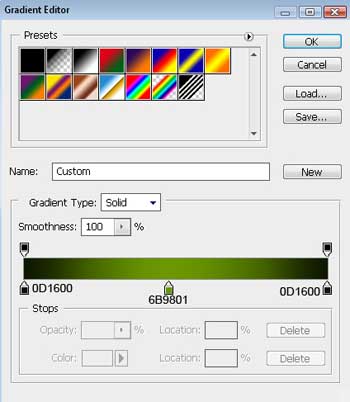
    Gradient’s parameters:

    Create Graphic Art in Photoshop CS3 

    Create Graphic Art in Photoshop CS3

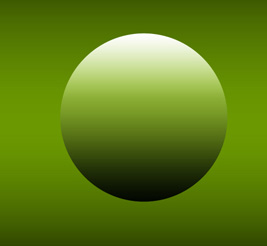
    Take the Ellipse Tool (U) now and try to make the primary layer, reserved for the small ball:
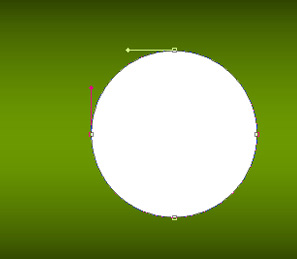
    Create Graphic Art in Photoshop CS3

    The layer’s parameters: Blending Options>Gradient Overlay
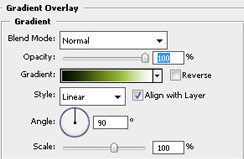
    Create Graphic Art in Photoshop CS3

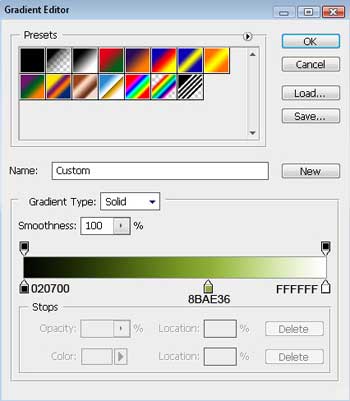
    Gradient’s parameters:

    Create Graphic Art in Photoshop CS3 

    Create Graphic Art in Photoshop CS3 

    Create Graphic Art in Photoshop CS3 Graphic Art
    Learn about orb special effects while converting an ordinary orb into a fantasy art piece in this Adobe Photoshop tutorial.

    WiFiReview.com - your guide to the wireless world