
Performance Car Club Wallpaper
This tutorial shows you how to create Vintage Cars Club wallpaper, that was inspired by rock n`roll and classic American cars.
Create a new file (File>New) that would have 1024×768 px and 72 dpi. Using the Paint Bucket Tool (G), try to paint the background in the next shown color’s code – #284B53

Create another new file (File>New) that must have 176×16 px and 72 dpi. Take the Pencil Tool (B) of 1 px and represent on the new layer the pattern shown next picture.
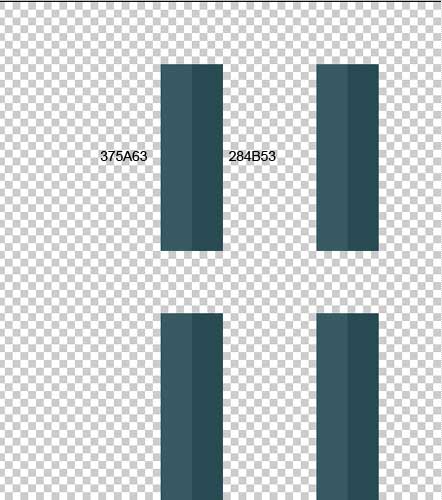
(the enlarged fragment)


Edit>Define Pattern
Next we’ll choose the Rectangle Tool (U) to represent the next background’s layer for the picture to be.

The layer’s parameters: Fill 0% on the layer
Blending Options>Inner Glow 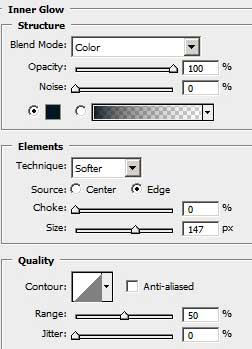
Blending Options>Gradient Overlay
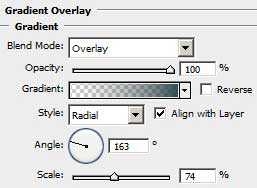
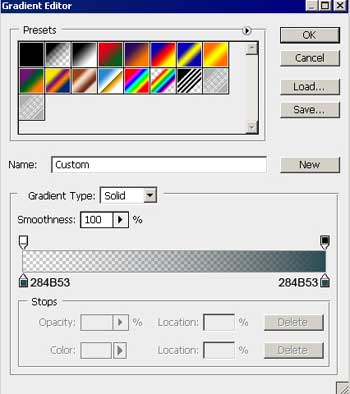
Gradient’s parameters:
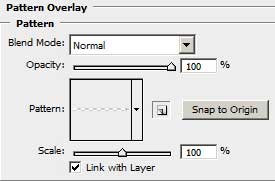
Blending Options>Pattern Overlay
Comments