Online Photo Portfolio
October 24th, 2007 by ART-D Posted in Adobe Photoshop, Web Layout
Selecting the same instrument and the same color, it’s possible to picture several more ornaments.
Make a copy of the last made layer and choose the Free Transform option to make the copy smaller and to place it the same way indicated below:
Make another copy of the same layer and select again the Free Transform option to place the copy exactly the way shown below.
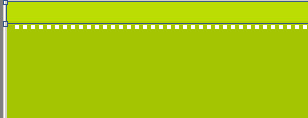
Create one more new layer (Create new layer) and apply on it the Pencil Tool (B) and the color #E3E3E3 to represent another pattern:
Save it: Edit>Define Pattern
Now we’ll select the Rounded Rectangle Tool (U) to represent the primary layer reserved for the site’s section that must have the white color.
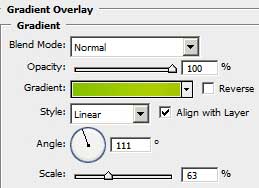
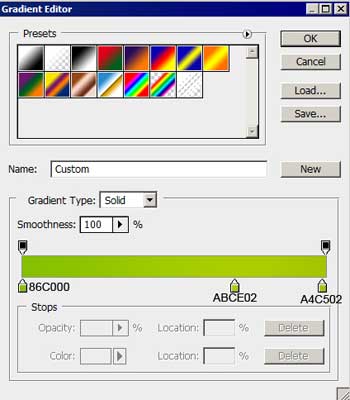
The layer’s parameters: Blending Options>Drop Shadow
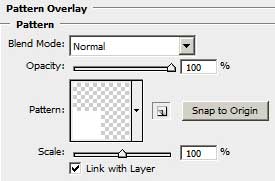
Blending Options>Pattern Overlay
Make two copies of the last made layer and apply the Free Transform option to place the copies the same way shown below:
We need to insert in the recently made sections the corresponding pictures:
Using the Rounded Rectangle Tool (U), we must represent the primary layer reserved for site’s section’s number, colored with #EBEBEB. The shape may be corrected again with the usual instrument applied in these cases: Convert Point Tool. 


Türks Bilişim
09/09/2009
this, very thank you..
Your site full professional and very beautiful…
css ajax styles
09/09/2009
yes this article is very fine.
vezir
01/03/2010
eeeeexcellent!!!!
Webdesign Mannheim
15/07/2010
Thanks a lot
Philliptan
17/07/2010
Thanks a lot , this is useful and i love your article !!!
Craig
08/09/2010
Great tutorial and really nice finished design, Thanks!
Lisa Thomason
20/09/2010
Wow! Fantastic online photo portfolio tutorial, very easy to follow, Thank you. LT
Md. Afsar Khan
07/11/2010
Very beautiful article realy …
but please let me know how can we make it live i mean slicing and setting in dreamweaver etc.
kenichifc
17/12/2010
thanks for tutorial. Love it, simple and effective
9633a
31/12/2010
Thank you for the tutorial
It is very beautiful
Ajveth
19/01/2011
Thank u this tutorial is very useful
โหลดเพลงฟรี
14/04/2011
very nice for this theme
Kapil
27/10/2011
very nice and eye catching website theme
thanks
amrew
04/12/2011
very nice