Categories

Partners
  • Free Flash Website

  • Website Templates

  • Desktop Wallpapers

  • Adobe Photoshop Tutorials

  • Bittorent and
    Google desktop programs

  • Free Stock Photos and Images

  • Adobe Photoshop Tutorials

  • Merry Christmas Tree

  • IPowerWeb Hosting
  • Search


    Advanced Search


    PSD to HTML

    Custom Floral Wallpaper
    Published  10/26/2007 | Designing

    Download PSD File

       
    Custom Floral Wallpaper - part 1


    Design a cool floral wallpaper from scratch with our tutorial.

    Begin by creating a new file (File>New) that would have 1024x768 px and 72 dpi and apply on the new file the Paint Bucket Tool (G) to represent it in this color #DDDDDD

    Create Custom Floral Wallpaper in Photoshop CS3

    Find in Internet a girl’s picture:

    Create Custom Floral Wallpaper in Photoshop CS3

    Cut it out:

    Create Custom Floral Wallpaper in Photoshop CS3

    Make the girl’s layer look black and white (pressing CTRL+SHIFT+U)

    Create Custom Floral Wallpaper in Photoshop CS3

    Apply for this layer the next filter’s option: Filter>Filter Gallery>Cutout, and use it also on the earlier made background.
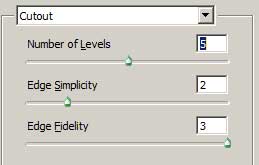
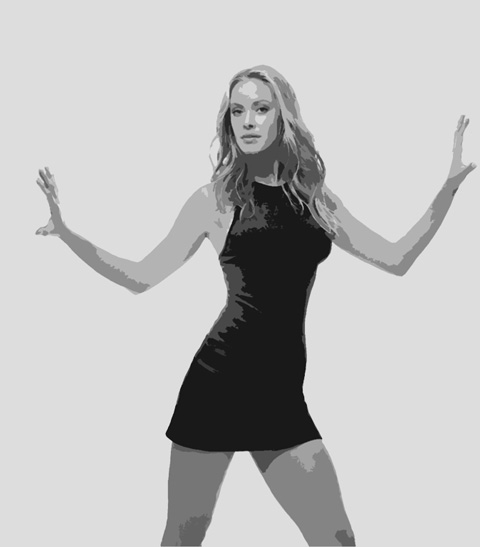
    Create Custom Floral Wallpaper in Photoshop CS3 

    Create Custom Floral Wallpaper in Photoshop CS3

    Make a copy of the new made layer, applying for the copy the filter’s option shown here: Filter>Distort>Twirl
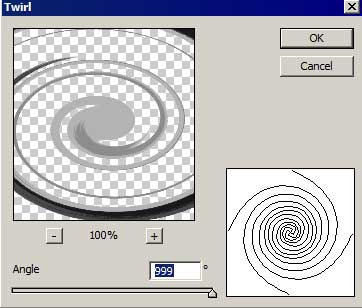
    Create Custom Floral Wallpaper in Photoshop CS3

    Hide for a while the first layer containing the girl on the layers’ panel.

    Create Custom Floral Wallpaper in Photoshop CS3

    Select now the Free Transform option to turn over the layer, changing the sizes and pacing it the way you may see the next picture.
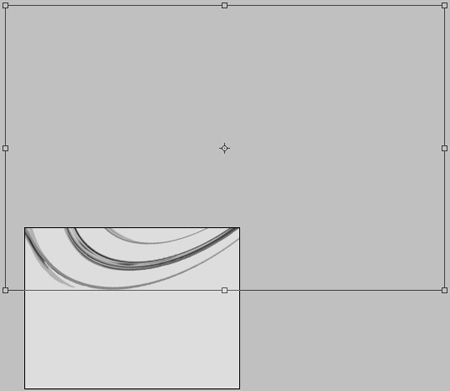
    Create Custom Floral Wallpaper in Photoshop CS3

    Change also the layer’s parameters: Fill 20%

    Create Custom Floral Wallpaper in Photoshop CS3

    Make a copy of the last made layer and select one more time the Free Transform option to turn the copy over and place it the way it is indicated below:

    Create Custom Floral Wallpaper in Photoshop CS3

    Make visible again the earlier hidden layer with the girl which is placed upper than the earlier described layers (on the layers’ panel).
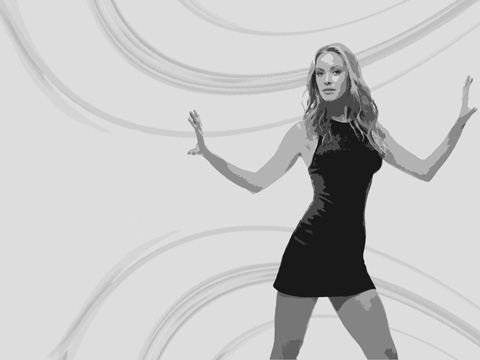
    Create Custom Floral Wallpaper in Photoshop CS3

    Apply for this layer the next parameter: Blending Options>Outer Glow
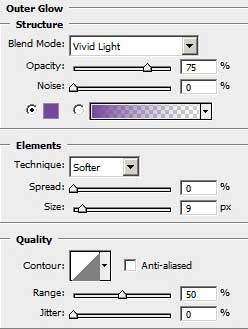
    Create Custom Floral Wallpaper in Photoshop CS3

    Create Custom Floral Wallpaper in Photoshop CS3 Custom Floral Wallpaper
    Design a cool floral wallpaper from scratch with our tutorial.