Easter gifts

March 23rd, 2008 by ART-D Posted in Adobe Photoshop, Designing

Make a copy of the layer with the grass and select then the Free Transform option to turn over the copy, positioning it above the layers containing the Easter eggs. Choose the Free Transform (warp) solution to change the layer’s perspective.

Create Easter Gifts Illustration in Photoshop CS3

Make several copies of the new layer we’ve got and choose again Free Transform option to turn over the copies for representing the nest the eggs will be situated in. This operation needs applying the Burn Tool (O) and the Dodge Tool (O) for darkening out the layers or lighting them too to get a more real effect.

Create Easter Gifts Illustration in Photoshop CS3

For getting the best result, it’s necessary to combine in a group all the nest’s layers, placed above the eggs’ layers (press CTRL button to mark out the corresponding layers and then hold on the left mouse’s button to take the marked layers on Create a new group solution). Put together the group’s elements (CTRL+E) and apply the Free Transform option to give the new layer a rounder shape.

Create Easter Gifts Illustration in Photoshop CS3

The layer’s parameters: Blending Options>Drop Shadow

Create Easter Gifts Illustration in Photoshop CS3 

Create Easter Gifts Illustration in Photoshop CS3

Take the Ellipse Tool (U) to draw a lot of small white circles.

Create Easter Gifts Illustration in Photoshop CS3

Using the same tool, try to make several more circles, colored with #B58B41

Create Easter Gifts Illustration in Photoshop CS3

Choose the Pen Tool (P) this time to draw a radial star of white color too.

Create Easter Gifts Illustration in Photoshop CS3

The new star’s layer needs to be copied four times and then applying Free Transform solution we need to change the copies’ sizes and their inclination direction.

Create Easter Gifts Illustration in Photoshop CS3

Create a new layer for using on it the Brush Tool (B) (Opacity of 20%) of white color to draw the stars’ illumination.

Create Easter Gifts Illustration in Photoshop CS3 

Create Easter Gifts Illustration in Photoshop CS3

The Easter picture is finished!

View full size here.

  •  

  •    
  •  


Post Pages: 1 2 3 4 5

  • 3boda207

    11/11/2010

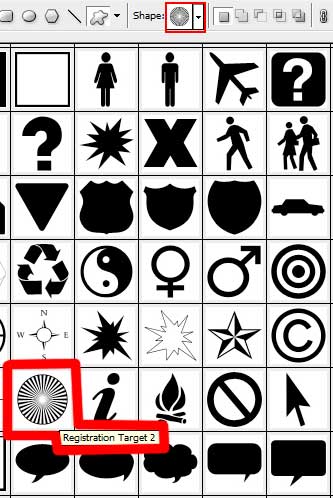
    I want these shapes for Photoshop
    Because I do not have this circular shape in photoshop
    And will wait for you reply
    Thank you

  • losergetslushie

    22/04/2011

    wonderful! thanks!