Art wallpaper with stars
April 10th, 2008 by ART-D Posted in Adobe Photoshop, Designing
Create another layer above the previous one and press CTRL+E for Merge Down the layers. Place the new got layer, containing the stripe as it is demonstrated below:
Make a copy of the last made layer and use on it the next filter’s options: Filter>Distort>Shear
Make three copies of the layer with the filter and select the Free Transform option to place the copies the same way indicated next image:
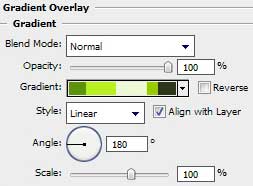
The two first layers containing the stripes should have the same parameters, shown below:
Blending Options>Drop Shadow
Next we have to make a click on Add a Mask option on the bottom part of the layers’ palette, but this click should be made on each layer containing the stripe. Select after that the Gradient Tool (G) to represent the half – opacity effect on the stripes’ ends. On the vertical stripe the half – opacity should be present on its top and its bottom.
Half – opacity effect on the left and right sides:
Apply the same method described above for the next layer too:


kunal kulkarni
02/11/2009
it is amazing!!!!!!!!!!!!!!!!!!!!!!!!!!!!!
DJ Marik
07/12/2009
Yay! I’m finally finished! lol. You weren’t kidding when you said “many layers”! I made 153 layers and it was worth it! awesome tut!!! here are my results. ^_^
http://blakkenshin.deviantart.com/art/Streams-of-Greens-145997469
MJP
29/01/2010
Wow! just tons of inspiration on this whole site! Just fantastic! Thanks so much!
dear25
07/04/2010
This is cool but the part where copying and resizing all the stars is soo tedious… Instead I just used a brush for the stars… Much easier for the same results
Greenafik
30/10/2010
I really like the final result ^^
Julie
03/02/2011
Can you help me please? My boss want an orange and green combinations of that,. please help me,
CSC
03/08/2011
Great picture!!! like it very much!!! Thanks
TayJ
20/08/2011
im having trouble with the part where you make the 2nd line and curve it round. because the lines in it just go straight down and don’t follow the shape that i have made. please help
Apoljak
15/03/2012
I wish this explained some stuff more thoroughly.
espada
03/01/2013
can we replace step making star using brush method…
ululf01
21/02/2013
is very nice thank you.