Categories

Partners
  • Website Templates

  • Adobe Photoshop Tutorials

  • Bittorent and
    Google desktop programs

  • Free Stock Photos and Images

  • Adobe Photoshop Tutorials

  • Photoshop, Flash, 3dsmax tutorials
  • Search


    Advanced Search


    Subscribe

    Dedicated Servers banner design
    Published  05/12/2008 | Designing
       
    Dedicated Servers banner design - part 1


    In this free tutorial we will show you how to quickly and easily create this picture that could be used as a web banner or flyer.
     
    Begin by creating a new file (File>New) with 410x198 px and 72 dpi

    Next choose the Rounded Rectangle Tool (U) (radius 10 px) to represent the background of the banner to be on the final stage.

    Create Dedicated Servers banner design in Photoshop CS3

    Select the next demonstrated parameters by making a mouse click on the layer we work with on the layers’ panel: Blending Options>Gradient Overlay
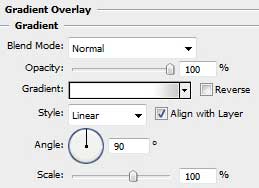
    Create Dedicated Servers banner design in Photoshop CS3

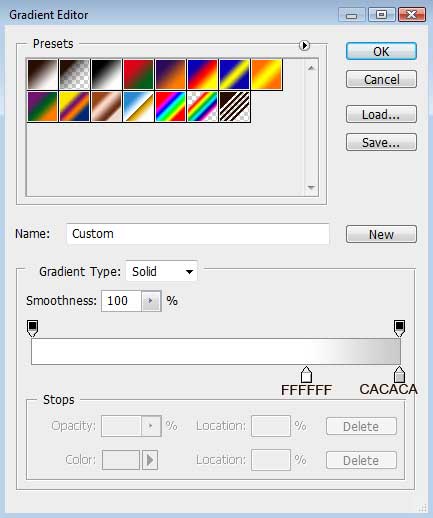
    Gradient’s parameters:

    Create Dedicated Servers banner design in Photoshop CS3

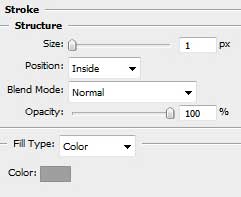
    Blending Options>Stroke

    Create Dedicated Servers banner design in Photoshop CS3 

    Create Dedicated Servers banner design in Photoshop CS3

    Find out in Internet a picture containing a server, cut it out and insert it on the made banner.
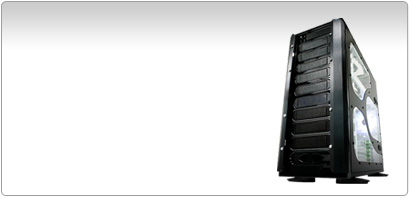
    Create Dedicated Servers banner design in Photoshop CS3

    Create a new layer and apply on it the standard Brush Tool (B) (Opacity 10 %) to draw the shadows under the server. The Eraser Tool (E) is helpful when erasing the unnecessary elements of the shadows. Place the shadows’ layer under the layer containing the server’s one (on the layer’s panel).
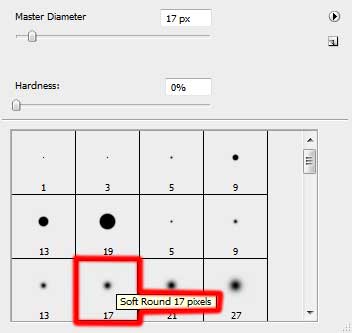
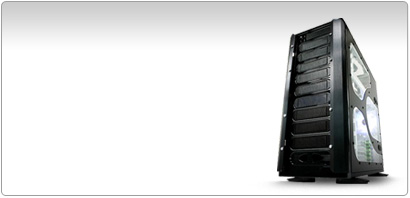
    Create Dedicated Servers banner design in Photoshop CS3 

    Create Dedicated Servers banner design in Photoshop CS3

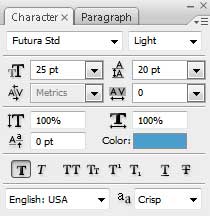
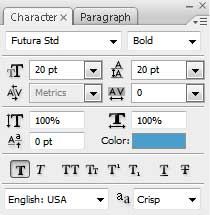
    Write now the banner’s title:

    Create Dedicated Servers banner design in Photoshop CS3

    DEDICATED

    Create Dedicated Servers banner design in Photoshop CS3

    SERVERS

    Create Dedicated Servers banner design in Photoshop CS3

    Create Dedicated Servers banner design in Photoshop CS3 Dedicated Servers banner design
    In this free tutorial we will show you how to quickly and easily create this picture that could be used as a web banner or flyer.

    WiFiReview.com - your guide to the wireless world