Website Design Studio
July 1st, 2008 by ART-D Posted in Adobe Photoshop, Web Layout
Insert on this stage the titles for the menu’s buttons, keeping the demands from below:
home page
the titles for the rest of the menu’s buttons:
The buttons’ titles should be written on the same layer, applying the next parameters for it:
Blending Options>Drop Shadow
Insert the divisions’ titles for the web page:
The text’s divisions should be inclined a little:
Insert the date on the news groups:
Introduce also the “contact us” phone on the inclined line from the left side. The text will be inclined as usually with Free Transform solution. 


faris vio
23/02/2010
good design guidelines, with perfect results
TonyFalcon
03/04/2010
superb ill mke it for my own site
chris
22/06/2010
Worthless guide, not enough information on each step…
DJs
05/09/2010
This guide needs much more information. It feels like big parts have been skipped.
moe
22/10/2010
is good tutorial..gives inspiration and something new.. i always visit this site to find any creation…could you mind giving other design….thanks
Aidan Langelaan
22/10/2010
Very good tutorial! I used this to create my own website, but then with some tweeks (twitter instead of second news article, colours etc.).
Manoj
21/02/2011
I am totally happy now after see this excellent tutorial. Now I can make my own.
dpuk44
12/06/2011
Hi I really like this and understand how to creat in Photoshop, however can someone explain how I would go about creating this as a website.
Would I slice the psd image up and using as background images in my CSS?
Thanx
jason
14/02/2012
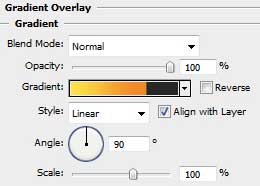
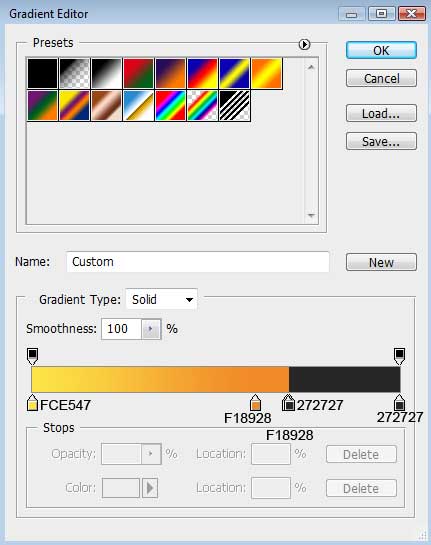
The result is very good but i think this tutorial is best for advance user only. A lot of steps are missing or unexplained to the beginner. Specially the gradient tool is not as easy to control the appearance of actual colors.
abd
24/02/2012
Please why you do not put link to download psd file ?
I’m beginner in photoshop
Brooke
19/04/2013
Woo wee, this was good stuff. Who creates this for you? I’ve got Five blokes that handle my site content, but they sort of stink after reading through this. Do you do all your own content or do you contract out?