Create Weaved Effect from a Photo
July 15th, 2008 by ART-D Posted in Adobe Photoshop, Photo Editing
Add this interesting photo effect to make your photos look modern.
Start working by creating a new file (File>New) with 1280×1024 px and 72 dpi.
Using the Rectangle Tool (U), try to make the background of the picture we want to get.

Apply the next shown parameters on this layer (clicking on the layer on the layers’ palette).
Blending Options>Gradient Overlay
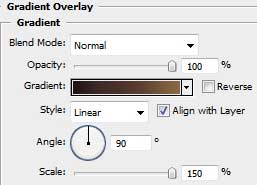
Gradient’s parameters:
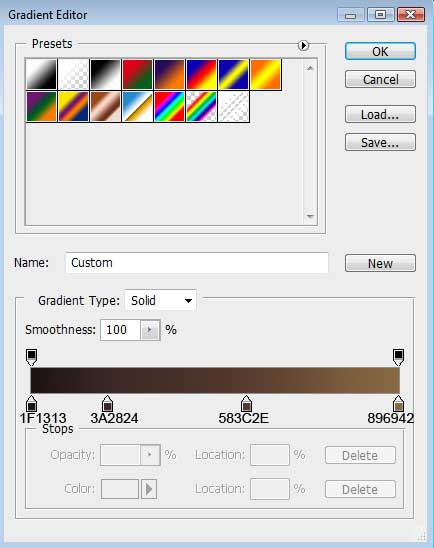
Create a new layer where we should use the Paint Bucket Tool (G) to give it the black color.

Set on the layer Filter>Noise>Add Noise
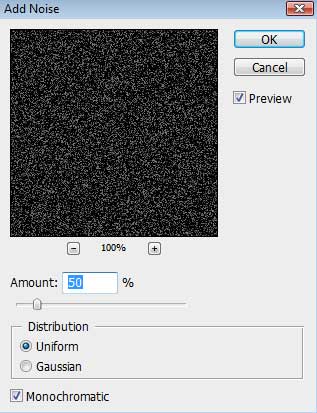
Set for the same layer the next parameter: Fill 50%
Blending mode-Color Dodge

Find in Internet a photo having pictured on it a young girl:

Cut her figure out of the old picture and insert it on the new one:
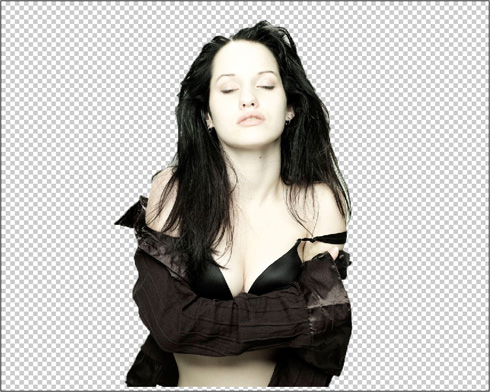
Select the next parameter for the girl’s layer: Blending mode-Hard Light

Post Pages: 1 2


Areli
26/10/2009
A M A Z I N G!!
Very creative, gratz.
fahimeh
15/02/2010
very nice and useful tutorial .
very thanks for that .
Super Venom
02/03/2010
Beautiful piece and amazingly looks easy to do. Many Thanks
sim1kinu
11/03/2010
will you PLEASE explain how to make the girl weaved better…this makes no sense
Gagcorpse
13/09/2010
Tutorial? I can see only tha girl! xD
Mike
15/09/2010
Nice Tutorial!
korndogg
18/11/2010
scroll to near the bottom where you’ll find a little link twards page two… very good tut.
langreo
06/04/2011
I tried it, but unless you explain more the details it was not very amicable to work I did not get results close to the final. B minus
Emanuele
07/07/2011
THANK YOU!!!!!
THIS IS MY WORK:
http://i289.photobucket.com/albums/ll201/emanuelemix/SCRATCHED.jpg
Mnd TechnõBøy
04/08/2011
Hello , Please Anyone Who KNow How to Do This Tutorial Add Me On FaceBook http://www.facebook.com/demaj.mnd
Im Linking To Much THis Tutorial But Im Stuck To The Page 2 , When NeeD To PainT The Girl .
Plz Anyone Who Can Help Me Add Me .! Thank’s .
rodrigo
23/11/2011
you must have made a mistake, the tutorial is incomplete
rodrigo
23/11/2011
sorry, did not see the other side …!