
The X Files – I want to belive
Well if you’re a movie buff of any bearing you would be aware of the looming release of ‘The X Files – I want to believe’. Let’s create nice wallpaper.
Create for the beginning a new file (File>New) of 1600×1200 px and 72 dpi. Paint it with black color, applying the Paint Bucket Tool (G).

Start representing the face of an alien. Firstly we need to represent the face’s contour. Choose the Pen Tool (P) and draw the contours element as in the picture below.

After that, select on the made layer Blending Options>Inner Glow, by making a mouse click on this layer on the layers’ palette. Start setting each option like it is shown below:

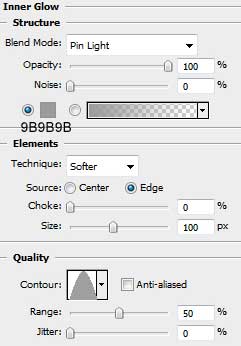
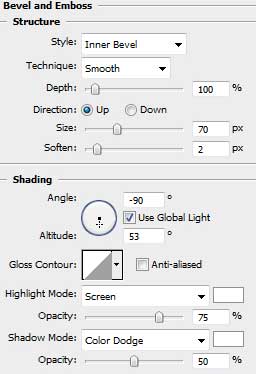
Blending Options>Bevel and Emboss
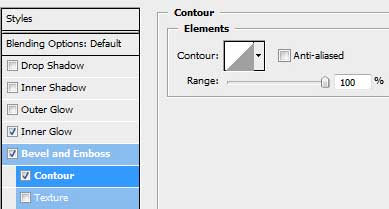
Blending Options>Bevel and Emboss>Contour
Blending Options>Satin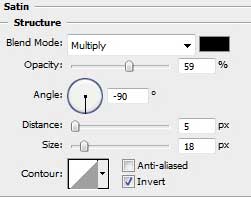
Blending Options>Gradient Overlay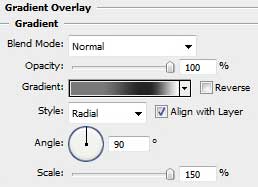
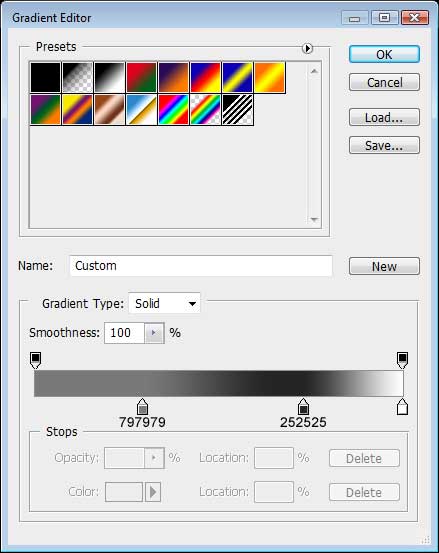
On the next table there may be seen the colors’ codes of the Gradient Editor.
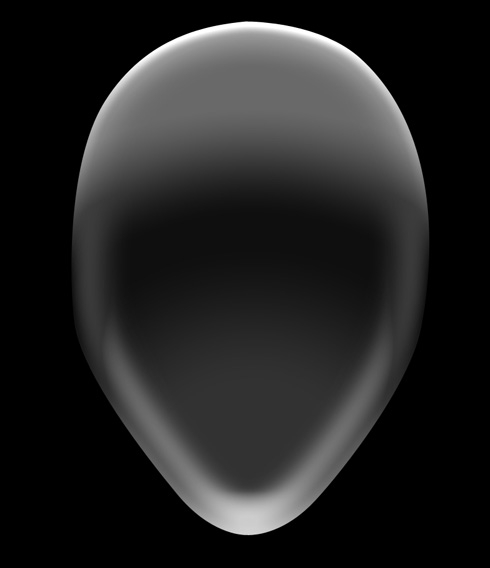
We need to obtain the face from below:
Using the same Pen Tool (P), try to make the eyes for the alien. In this case it’s enough to make just one eye which may be copied later (Ctrl+J). The eye may be also turned, applying the Free Transform selection (Ctrl+T)

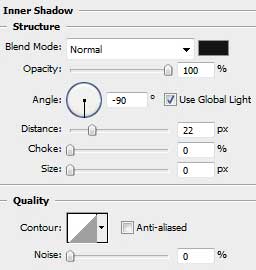
Give the same Blending Options – Inner Shadow parameters for both layers
Comments