
Create a Magic Orb
I will show you how to create a magic crystal orb with some nice light effects.
For the beginning we need to create a new file of 1280×1024 px and 72 dpi. After that select on this layer Blending Options>Gradient Overlay by making a mouse click on the layer we work with on the layers’ palette, setting the next adjustments.
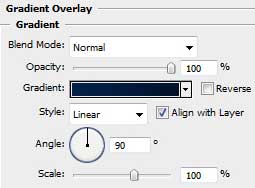
Set the appropriate gradient.
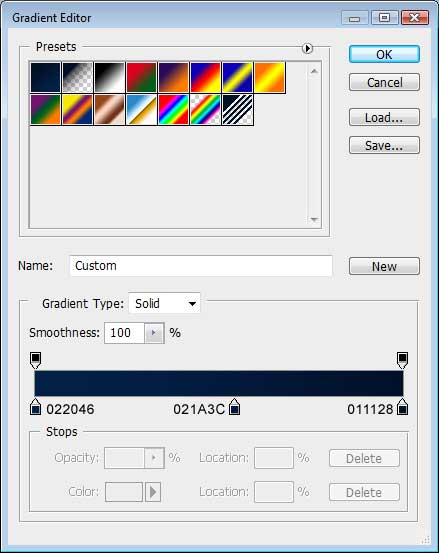
We need to get the same background from below:


After that, select the Rectangle Tool (U) to draw a sphere like the next one.

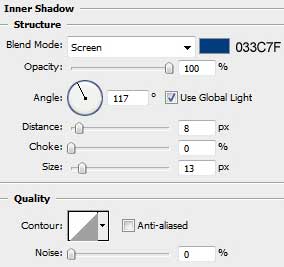
Set Blending Options>Inner Shadow:
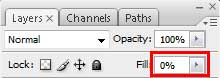
Apply the next demonstrated fill’s value for the made layer.
We’ll get the next contour.

Create a new layer and use on it the Brush Tool (B) and the Eyedropper Tool (I) to paint the sphere the same way demonstrated below, applying the background’s colors.

Try to make one more sphere now.

Apply the same settings from below, inserting also the same opacity value as we did with the previous sphere.
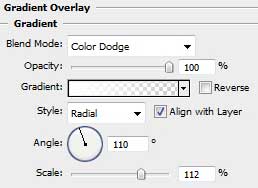
Blending Options>Gradient Overlay:
This is the result we should get on this stage:

Try to make one smaller sphere applying a whole range of settings for it for giving the effect of inside glow.

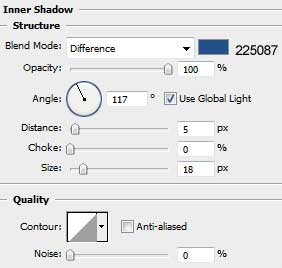
You may see below the color’s code.
Blending Options>Inner Shadow:
Comments