Customizing FreeHand MX for Multimedia/Web Output
June 16th, 2006 by Posted in Macromedia FreeHand, Macromedia Products
|
Customizing FreeHand MX for Multimedia/Web Output Just a few changes transforms FreeHand MX from a printer-friendly application into a multimedia/web-friendly one. Below, you’ll customize FreeHand MX for multimedia/web output with the following settings:
- Document unit of measure = Pixels
- Document custom size and wide orientation = Web (or other appropriate size for output on screen)
- Color management = None
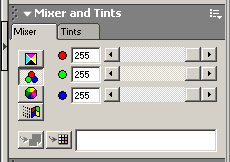
It is very important to use RGB or Web Safe Colors. This is easy with the Fill and Stroke Color buttons on the main Tools panel. In FreeHand MX, these buttons have the same function as in the other products in the Studio MX suite.
Note: If you prefer using the Color Mixer in the Mixer and Tints panel, make sure you click the RGB button (the second button), as shown below, because the FreeHand defaults to the CMYK button (the top button):
|
|

|
|
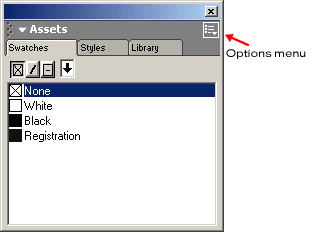
You can also use the Web Safe Color Library by opening the Assets panel and clicking the Options menu in the Swatches tab:
|
|

|
|
To adjust the settings, use the following steps:
- Open Macromedia FreeHand MX.
- Select File > New to create a new document.
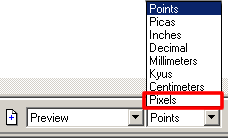
- Change the document unit of measure from Points (default) to Pixels using the units pop-up menu at the bottom of the FreeHand MX application window.
|

|
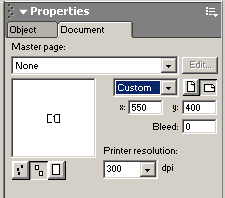
- Select the Document tab in the Properties inspector and change the document’s page size from Letter (default) to the Web predefined page size of 550 x 400 pixels, or use a Custom size page and enter the appropriate dimensions. Be sure the page orientation is wide (as shown).
|

|
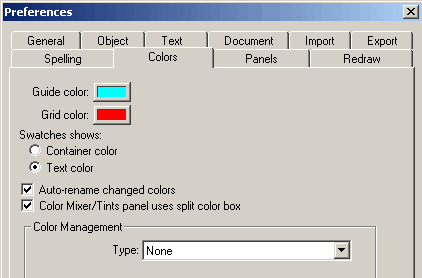
- Press Control-U (Command-U) to check the Color Management type; if necessary, change the type to None. Click OK to close the dialog box.
|
|
|
You can save these multimedia/web-friendly customizations as a FreeHand template. For more information on creating templates, refer to Help > Using FreeHand MX.
|
If you enjoyed this article, please consider sharing it!